How to Boost AMD Ryzen 9000 Series Gaming Performance: AMD OPP, MSI Memory Try It, and High-Efficiency Mode
Motherboards
With the launch of the Ryzen 9000 series processors, AMD introduced the new AMD Optimized Performance Profile (OPP) feature, which offers a DDR5-6000 CL30 overclocking profile to enhance memory and gaming performance.
In addition to AMD OPP, MSI Memory Try It! provides a variety of memory frequency and timing combinations to maximize your memory's potential. Combined with the optimization settings of High-Efficiency Mode, you can achieve further performance gains.
AMD Optimized Performance Profile – Boosts Gaming Performance by 13%
AMD OPP is designed for RAM modules using Hynix chips, providing a DDR5-6000 CL30-38-38-96 overclocking profile. DDR5-6000 is the sweet spot for Ryzen 7000 and 9000 series processors, offering optimized performance.
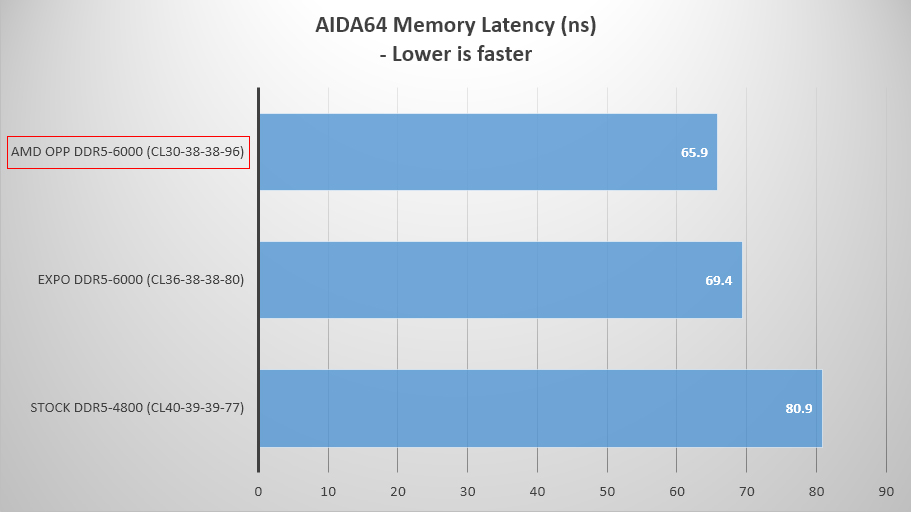
Using the Ryzen 7 9700X processor, we tested memory and gaming performance. Compared to the default DDR5-4800, AMD OPP reduces latency by about 19% and by approximately 5% compared to DDR5-6000 EXPO. At 1080p resolution, gaming performance is 2~13% faster than the default DDR5-4800.


AMD OPP + MSI High-Efficiency Mode – Further Boosts Gaming Performance by 2~8%
If you're looking for even better performance than what AMD OPP offers, try pairing it with MSI's High-Efficiency Mode. It provides optimized memory settings for further performance enhancement.
High-Efficiency Mode offers four presets: Tightest, Tighter, Balance, and Relax, allowing users to choose the best settings based on their RAM's overclocking capabilities.
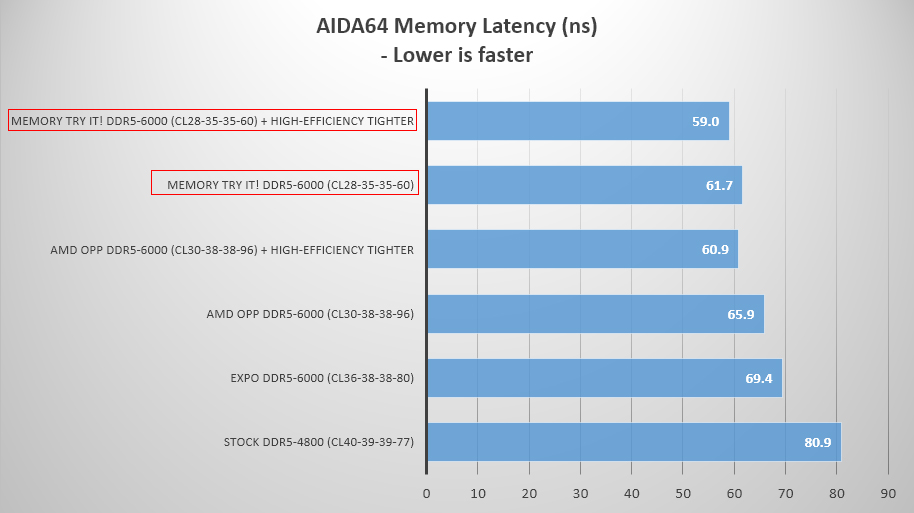
Using AMD OPP plus the Tighter preset in High-Efficiency Mode can reduce latency by about 8% and boost 1080p gaming performance by 2~8% compared to AMD OPP alone.


MSI Memory Try It! + High-Efficiency Mode – Gaming Performance 3~10% Faster than AMD OPP, 6~22% Faster than Default
MSI Memory Try It! offers multiple overclocking combinations for common memory chips like Hynix, Samsung, and Micron, helping users quickly find the best settings for their memory.
Compared to the AMD OPP DDR5-6000 CL30-38-38-96 setting, Memory Try It! offers higher frequency and tighter timing combinations for better performance. For example, the DDR5-6000 CL28-35-35-60 setting reduces memory latency by about 7% compared to AMD OPP. When combined with the Tighter preset from High-Efficiency Mode, latency is reduced by about 10% compared to AMD OPP.
In terms of 1080p gaming performance, the DDR5-6000 CL28-35-35-60 setting from Memory Try It! combined with High-Efficiency Mode's Tighter profile is 3~10% faster than AMD OPP, 3~13% faster than DDR5-6000 EXPO, and 6~22% faster than the default DDR5-4800.


System Configurations:
- Processor: AMD Ryzen 7 9700X
- Motherboard: MSI MAG X670E TOMAHAWK WIFI
- Memory: Galax HOF Pro D5-7200 16GB x2, Kingston FURY Beast DDR5-6000 16GB x2
- Graphics Card: MSI GeForce RTX 4080 16GB SUPRIM X
- CPU Cooler: MSI MAG CORELIQUID I360
- Power Supply: MSI MEG Ai1000P PCIE5
- Operating System: Microsoft Windows 11 Pro 23H2
Memory profiles tested:
- Stock – DDR5-4800 CL40-39-39-77
- EXPO – DDR5-6000 CL36-38-38-80
- AMD OPP – DDR5-6000 CL30-38-38-96
- Memory Try It! – DDR5-6000 CL28-35-35-60
Note:
- Enabling AMD Optimized Performance Profile (OPP) may increase boot time.
- AMD Optimized Performance Profile, MSI Memory Try It!, and High-Efficiency Mode involve memory overclocking, which may cause system instability.
- The performance may vary based on system configurations.