Do AGESA 1.0.0.7c BIOS and MSI High-Efficiency Mode Improve Gaming Performance?
Motherboards
MSI has recently released new BIOS update for AM5 motherboards featuring the latest AGESA 1.0.0.7c. This update brings a significant boost in RAM support, with the maximum supported frequency jumping from about DDR5-6000 in AGESA 1.0.0.7a to DDR5-7600 in AGESA 1.0.0.7c. When combined with CPUs equipped with a robust Integrated Memory Controller and motherboard hardware design, this enhancement can even push the frequency to DDR5-8000 and beyond.
The increase in RAM frequency not only results in higher bandwidth and lower latency but also enhances gaming performance, particularly for games running NVIDIA RTX 4090 graphics cards at 1080p resolution. When paired with MSI's exclusive High-Efficiency Mode, the improvement in gaming performance becomes even more pronounced.
MSI High-Efficiency Mode - Boosting Performance through Optimized RAM Settings
The High-Efficiency Mode from MSI is designed to optimize popular memory modules available in the market. This feature increases memory bandwidth and reduces latency. High-Efficiency Mode offers four sets of RAM timing settings: Tightest, Tighter, Balance, and Relax. This allows users to find out the optimal configuration based on the quality of their memory modules.


AGESA 1.0.0.7c + High-Efficiency Mode vs AGESA 1.0.0.7a – Boosting Memory Performance by 24% Bandwidth Increase and 18% Latency Reduction
AGESA 1.0.0.7c not only supports higher RAM frequencies like DDR5-7600 and even beyond DDR5-8000, but also, depending on the CPU's Integrated Memory Controller quality and motherboard hardware design, it elevates the supported MCLK:UCLK 1:1 frequency from the DDR5-6000 of AGESA 1.0.0.7a to DDR5-6400 (1:1).
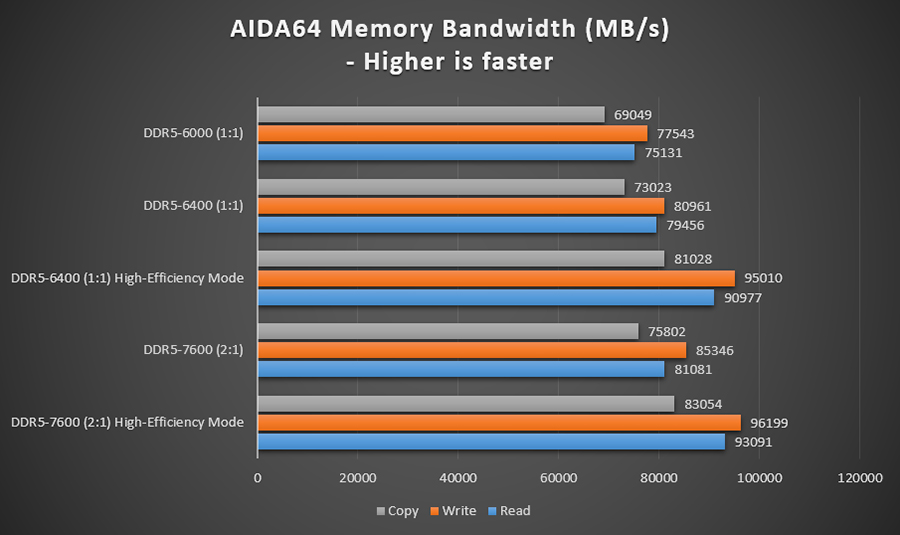
Results from AIDA64 tests reveal that the memory read bandwidth of DDR5-7600 (2:1) supported by AGESA 1.0.0.7c has improved by 8% compared to DDR5-6000 (1:1), while the latency of DDR5-6400 (1:1) is reduced by 9% compared to DDR5-6000 (1:1).
By enabling MSI's High-Efficiency Mode, there's a remarkable 24% increase in read bandwidth and a substantial 18% reduction in latency compared to DDR5-6000 (1:1). This indicates that the High-Efficiency Mode offers greater performance enhancement than the higher RAM frequencies introduced by AGESA 1.0.0.7c.
*The performance may vary depending on your system configurations.

*The performance may vary depending on your system configurations.
High-Efficiency Mode + AGESA 1.0.0.7c – Significantly Boosting Game Performance by up to 12%
When using an RTX 4090 graphics card, we compared the gaming performance between the DDR5-6400 (1:1)/DDR5-7600 (2:1) supported by AGESA 1.0.0.7c and the DDR5-6000 (1:1) of AGESA 1.0.0.7a. At a resolution of 1080p, AGESA 1.0.0.7c exhibited about a 4% increase in FPS compared to AGESA 1.0.0.7a. Furthermore, with High-Efficiency Mode enabled, the FPS continued to rise, achieving an approximately up to 12% improvement.。
At a resolution of 2560x1440, 1.0.0.7c outperformed 1.0.0.7a by around 4%, and when combined with High-Efficiency Mode, the improvement reached about 10%.
These performance test results clearly show that High-Efficiency Mode can effectively enhance game performance even more than the increased RAM frequencies brought by AGESA 1.0.0.7c.

*The performance may vary depending on your system configurations.

*The performance may vary depending on your system configurations.
However, it's important to note that the enhanced memory performance might not directly translate to higher game performance for the RTX 4060 Ti graphics card. The performance improvements brought by the AGESA 1.0.0.7c and MSI High-Efficiency Mode are more pronounced with higher-tier graphics cards like the RTX 4090.
System Configurations
CPU:AMD RYZEN 9 7950X
Motherboard:MSI MAG B650M MORTAR WIFI, BIOS vA6
RAM:Kingston Fury Beast DDR5-6000 16GBx2 / Vcolor DDR5-7600 16GB x2
Graphics Cards:MSI RTX 4090 SUPRIM X 24G
Cooler:MSI MEG CORELIQUID S360
Power Supply Unit:MSI MPG A1000G PCIE5
Operating System:Windows 11 22H2
Motherboard:MSI MAG B650M MORTAR WIFI, BIOS vA6
RAM:Kingston Fury Beast DDR5-6000 16GBx2 / Vcolor DDR5-7600 16GB x2
Graphics Cards:MSI RTX 4090 SUPRIM X 24G
Cooler:MSI MEG CORELIQUID S360
Power Supply Unit:MSI MPG A1000G PCIE5
Operating System:Windows 11 22H2
MSI X670 & B650 Motherboards:
https://th.msi.com/Landing/amd-am5-x670-b650-motherboard
MSI GEFORCE RTX 40 Series:
https://th.msi.com/Landing/GeForce-RTX-40-graphics-cards/graphics-cards
MSI CPU Liquid Cooling :
https://th.msi.com/Liquid-Cooling//
MSI Power Supply:
https://th.msi.com/Power-Supply
https://th.msi.com/Landing/amd-am5-x670-b650-motherboard
MSI GEFORCE RTX 40 Series:
https://th.msi.com/Landing/GeForce-RTX-40-graphics-cards/graphics-cards
MSI CPU Liquid Cooling :
https://th.msi.com/Liquid-Cooling//
MSI Power Supply:
https://th.msi.com/Power-Supply