Back

MSI Click BIOS X Revealed: Simplified Overclocking, New Looks, and Unmatched Control

Motherboards

MSI’s range of 800-series motherboards for Intel and AMD (Z890 and X870, respectively) are built to handle even the most demanding hardware, inside and outside. These motherboards boast several convenient EZ DIY features, robust power delivery, supplemental on-board PCIe power, and more.

But that’s not all. You’ll also find a brand-new BIOS interface to go along with it – the MSI Click BIOS X!

We’ll go over why this change was needed, what improvements you can expect, and a few features you can enjoy with this new interface.

MSI Click BIOS X Improvements: Looks, Performance, Personalization, and More

Although our Click BIOS 5 interface has managed to get the job done for years, the complexity of modern hardware is becoming more challenging. You might need access to several additional BIOS settings for overclocking, toggling simple settings, or tweaking features.

Now, one way to go about this is to bury them under different menu options. But that’s hardly convenient.

Another way is to do it all over!

MSI Click BIOS X is engineered from the ground up to offer a reimagined, modern User Interface for a far superior user experience. It puts you back in control – allowing you to find the BIOS settings you need to get the most out of your PC, without trudging through several menus.

A Fresh Look: MEG, MPG, and MAG Colors

While our older Click BIOS interfaces (on most MSI motherboards) have always looked identical to each other, they lacked personality. With Click BIOS X, you can expect to find an interface that more closely matches the style of your motherboard.
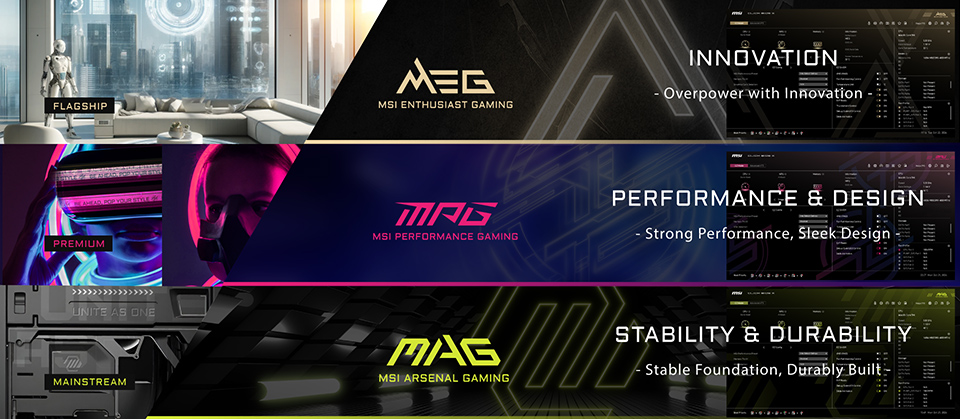
Z890 vs. Z790
(MEG, MPG, and MAG)

MEG motherboards, for example, will feature a gorgeous gold and black interface to closely match its style of products. MPG motherboards now boast a more lively, pink color scheme, while MAG adopts its signature yellow to more closely reflect your motherboard’s design ideals.

That said, even though the look and color of these interfaces might vary, Click BIOS X offers an identical user experience on every MSI motherboard (limited only by feature availability).

Reimagining EZ Mode on Click BIOS X

EZ mode or the ‘simple’ interface on the Click BIOS X isn’t meant to hide away the options that you need in your BIOS. Instead, it gives you quick access to every functionality most users will need to get their PC up and running.

Of course, you can switch to Advanced Mode, if that’s more your thing, by hitting the ‘F7’ key.

EZ Overclocking: CPU, Memory, and NPU

EZ Mode gives you quick access to BOOST toggles – allowing you to overclock your hardware with one click.
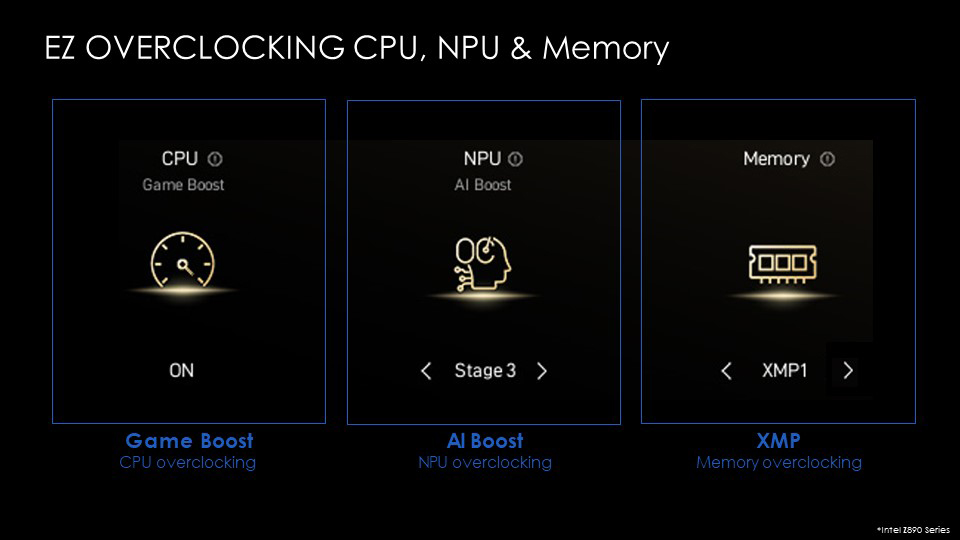
EZ Overclocking

Here, you can manage features like Game boost for CPU overclocking, XMP for memory overclocking, and AI Boost for NPU overclocking.

With this feature, you can gain performance improvements as long as you have the cooling needed to tame your hardware. For example, NPU overclocking can get you up to 27% better AI performance on Intel Core Ultra’s on-chip NPU.

EZ On/Off: Toggles, Toggles, and Toggles

Have you ever wanted to quickly toggle on a feature, like the Trusted Platform Module (TPM), and instead find yourself wading through a bunch of BIOS options?
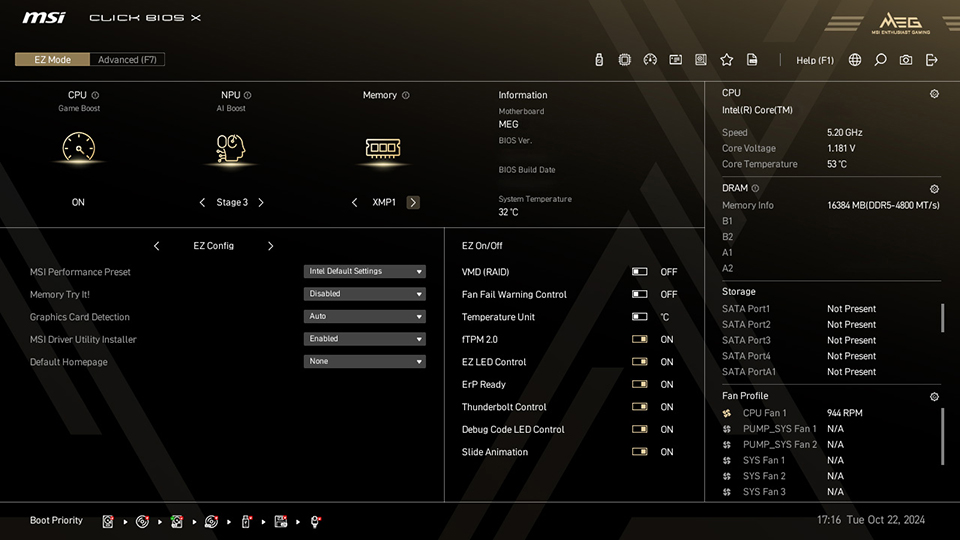
EZ Overclocking

The EZ On/Off section seeks to end this madness by putting several common feature and functionality toggles within a dedicated section in EZ Mode. You can find convenient toggles for options like RGB lighting, FTPM 2.0, animations, Temperature Units, and more in this section.

EZ Config: Your BIOS, Your Way

Even though EZ Mode does a great job at giving you access to commonly-used functionality, advanced users might need a bit more.

That’s where the fully customizable ‘EZ Config / Favorite’ section within EZ Mode, can help. Simply populate your favorites with the settings/options/toggles that you need, and you can access them faster than ever.
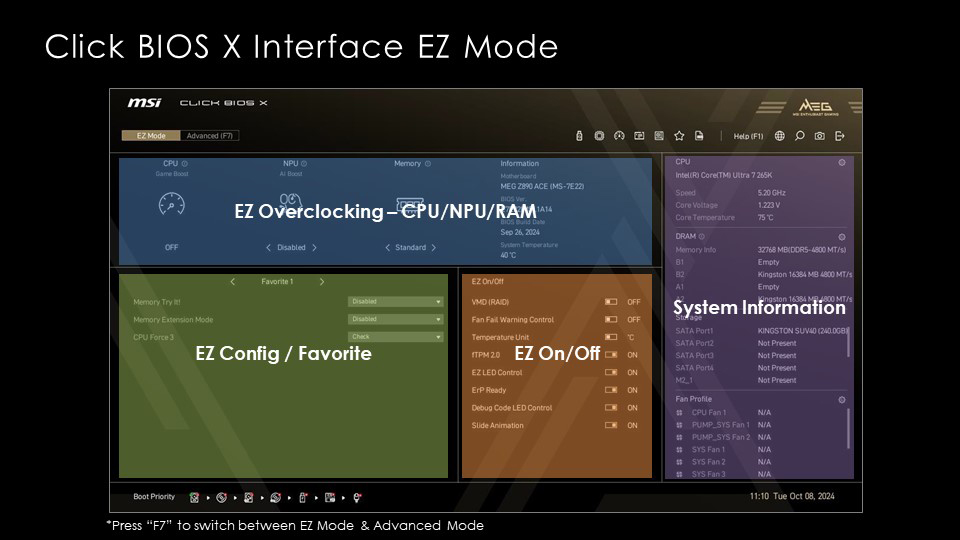
EZ Overclocking

From Memory Try It! to setting RGB lighting, you decide what you see within that section.

Redesigned Hardware Monitor: Customize Your Fan Curves and More

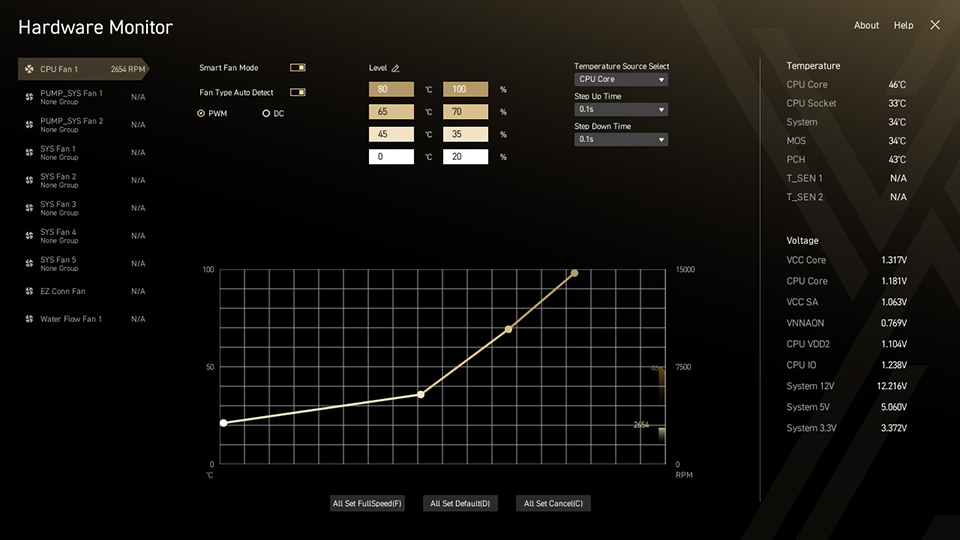
Setting your fans up exactly the way you want them shouldn’t be a struggle. MSI Click BIOS X’s brand-new Hardware Monitor design gives you access to exactly what you need to set the perfect fan curves.
EZ Overclocking

You can fine-tune the temperature and corresponding fan speed values to make sure that your system remains completely silent when it’s idle and only spins up to cool your hardware when your PC is powering through some heavier workloads. You can also drag the fan curve with your mouse to customize it to your liking.

BIOS Screenshots (F12)

You might want to take screenshots of your BIOS for work, troubleshooting, or any reason at all. MSI Click BIOS X simplifies this process by giving you a neat interface to pick a storage location for your screenshots.

BIOS Screenshots

MSI EZ OC Tuning for Intel Processors

Overclocking is an amazing opportunity to get more out of your current hardware. Professional overclockers, for example, can extract a ton of performance from their hardware to set world records. However, not everyone has the knowledge or the time to sit and dial in individual settings and invest into some heavy trial-and-error phases.

EZ OC Tuning controls in MSI’s Click BIOS X are designed to give you the tools you need to set overclocks without too much effort.

CPU Force 3 and Memory Force: Estimate Your CPU and Memory OC Potential

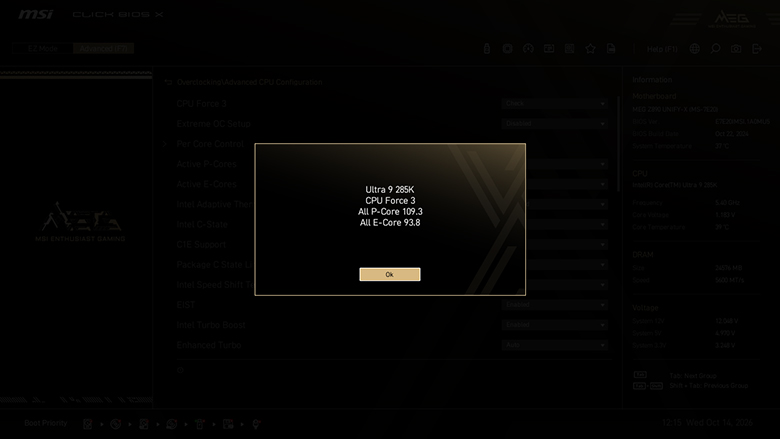
In addition to featuring innovative designs and top-tier components, MEG motherboards have a few unique features that’ll help enthusiasts and hardcore overclockers unlock new tiers of performance. MEG motherboards now feature CPU Force 3 and Memory Force — allowing them to detect and estimate the overclocking potential of your installed hardware!
BIOS Screenshots

BIOS Screenshots

CPU Force 3 on Intel Z890 motherboards gives you an estimate of how far you’ve already pushed Intel’s Core Ultra processors (P-core and E-core), giving you the information you need to decide whether it’s worth trying for a better overclock.

Similarly, Memory Force detects how close you are to maximizing your DDR5 memory’s performance. The lower the number, the closer you are to achieving the full potential of your kit.

Of course, overclocks depend on a variety of factors so your mileage may vary compared to someone else with even slightly different hardware.

Memory Try It!

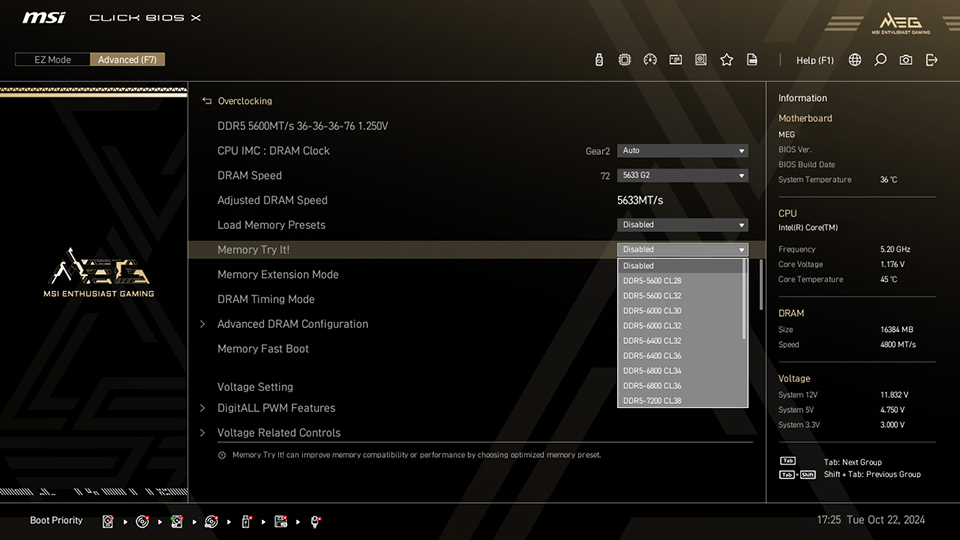
Although older MSI BIOS interfaces do give you access to the Memory Try It! feature, we felt it wasn’t very intuitive to reach. Click BIOS X places Memory Try It! within the EZ Config menu for quick access – allowing you to quickly cycle through different memory settings and rebooting.
MSI Click BIOS X

Memory Try It! now offers over 50 memory overclocking profiles (based on your memory kits), with tweaked frequency and timing settings. You should be able to find an ideal overclock for your DDR5 memory without too much hassle, thanks to this feature.

Memory Extension Mode: Optimizing Memory Performance

While Memory Try It! is a great feature to quickly try out a few settings, it can still be daunting for gamers and users not too comfortable with trying out a bunch of options.

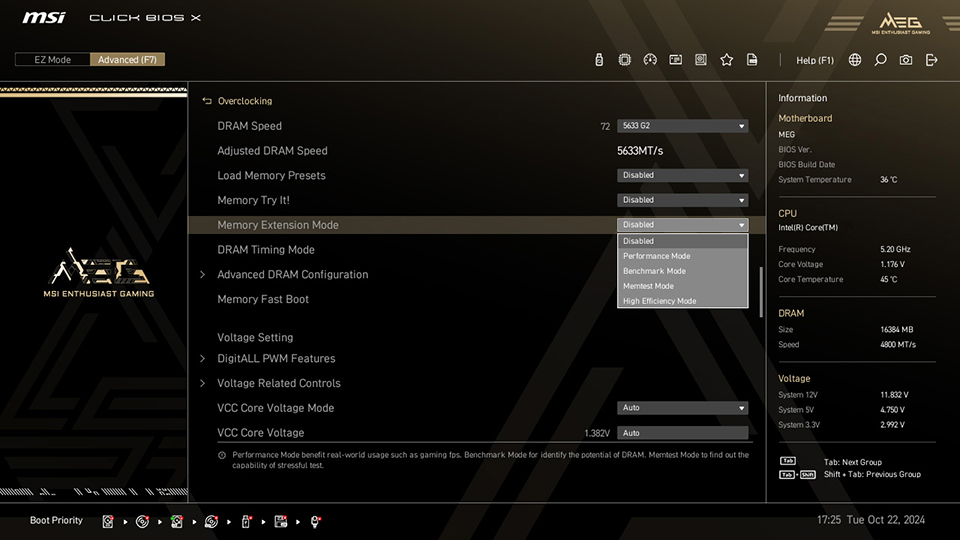
Memory Extension Mode in MSI Click BIOS X is only a click away and offers 4 preset modes at the same frequency —Performance Mode, Benchmark Mode, High Efficiency Mode, and Memtest Mode—to optimize memory parameters like speed and latency to improve performance in scenarios like benchmarking, gaming, etc.

MSI Click BIOS X

MSI Click BIOS X

According to a few tests with Memory Extension Mode enabled, we found up to 14% better performance compared to just setting XMP and calling it a day.

MSI Performance Preset: Power Limitation Setting

The ‘MSI Performance Preset’ options allows you to choose how you want to run your hardware with 4 presets (as of publishing) — Intel Default Settings, MSI performance Settings, MSI Extreme Settings, and MSI Unlimited Settings.

Each preset changes a bunch of settings within predefined limits to get the most out of your Intel Core Ultra processors.

Intel Z890 and AMD X870 Motherboards: Featuring MSI Click BIOS X

You’ll find MSI Click BIOS X on all the current generation Intel Z890 and AMD X870 (and X870E) motherboards for Intel Core Ultra processors (Series 2) and AMD Ryzen processors (AM5). It’s a fresh new take on how a BIOS should look and feel, and focuses on improving your experience while ensuring you have access to the tools you need to get the most out of your hardware.

While we’ve tried to cover as many Click BIOS X features as we could in this article, we haven’t even scratched the surface! The full list of changes and improvements will be far too extensive to cover, so we’re excited to let you explore, experience, and enjoy many more functions and features on our latest motherboards.

You’ll find more details about MSI’s Z890 motherboard lineup for Intel Core Ultra processors (Series 2), also known as Arrow Lake, here.

If you’re looking for AMD, head here to learn more about the MSI X870E and X870 Motherboard lineup!
Related Blogs

ทำไม ROM 64MB จึงสำคัญบนเมนบอร์ด คู่มือฉบับสมบูรณ์สำหรับการจัดเก็บ BIOS คุณสมบัติ และการเตรียมความพร้อมสำหรับอนาคต

August 31,2026

ทำไม ROM 64MB จึงสำคัญบนเมนบอร์ด คู่มือฉบับสมบูรณ์สำหรับการจัดเก็บ BIOS คุณสมบัติ และการเตรียมความพร้อมสำหรับอนาคต

เมื่อเลือกเมนบอร์ด ข้อมูลจำเพาะต่าง ๆ เช่น การจ่ายไฟ การสนับสนุน PCIe ความเร็วหน่วยความจำ และการเชื่อมต่อมักได้รับความสนใจมากที่สุด แต่ข้อมูลจำเพาะอีกประการหนึ่งกำลังมีความสำคัญมากขึ้นสำหรับแพลตฟอร์มสมัยใหม่: ความจุ BIOS ROM. ROM หรือชิปหน่วยความจำแฟลชบนเมนบอร์ดจัดเก็บ เฟิร์มแวร์ UEFIเฟิร์มแวร์นี้จะเริ่มต้นการทำงานของโปรเซสเซอร์ หน่วยความจำ ที่เก็บข้อมูล กราฟิกส์ และฮาร์ดแวร์อื่น ๆ ก่อนที่ระบบปฏิบัติการจะเริ่มทำงาน นอกจากนี้ยังมีอินเตอร์เฟซ BIOS และส่วนประกอบการกำหนดค่าและความเข้ากันได้จำนวนมากที่จำเป็นต้องสนับสนุนโปรเซสเซอร์และคุณสมบัติระบบที่แตกต่างกัน เมื่อแพลตฟอร์มมีความซับซ้อนมากขึ้นและสนับสนุนฮาร์ดแวร์หลายรุ่น เฟิร์มแวร์ก็จะมีความซับซ้อนมากขึ้นเช่นกัน นี่คือจุดที่ 64MB BIOS ROM สามารถให้ความได้เปรียบที่สำคัญ ชิป ROM บนเมนบอร์ดเก็บอะไรอยู่จริงๆ คิดถึง BIOS ROM เป็นที่เก็บข้อมูลเฉพาะสำหรับสภาพแวดล้อมเฟิร์มแวร์ของเมนบอร์ด มันประกอบด้วยรหัสการเริ่มต้นและความเข้ากันได้ของโปรเซสเซอร์ ข้อมูลการเริ่มต้นหน่วยความจำ ฟังก์ชันการกำหนดค่าฮาร์ดแวร์ คุณสมบัติความปลอดภัย ฟังก์ชันการบู๊ต และอินเทอร์เฟซกราฟิก UEFI บนเมนบอร์ด MSI ที่รองรับ อินเทอร์เฟซนั้นประกอบด้วย Click BIOS X. มันให้ทั้ง EZ Mode และ Advanced [...]

เงื่อนไขใดบ้างที่ซอฟต์แวร์ RGB ที่ดีที่สุดควรมี

August 04,2026

เงื่อนไขใดบ้างที่ซอฟต์แวร์ RGB ที่ดีที่สุดควรมี

คุณได้ใช้ประโยชน์สูงสุดจากการตั้งค่า MSI RGB ของคุณแล้วหรือยัง คุณมีฮาร์ดแวร์ MSI อยู่แล้ว แต่คุณได้เลือกซอฟต์แวร์ RGB ที่เหมาะสมหรือยัง ในขณะที่ฮาร์ดแวร์ระดับพรีเมียมเป็นรากฐาน ซอฟต์แวร์ RGB ของคุณกำหนดว่าอุปกรณ์ของคุณทำงานร่วมกันได้อย่างราบรื่นเพียงใด การเลือกโซลูชันที่ถูกต้องสามารถช่วยให้คุณใช้ประโยชน์เต็มที่จากระบบนิเวศ MSI หลีกเลี่ยงความซับซ้อนในการตั้งค่าที่ไม่จำเป็น หรือแม้กระทั่งปรับปรุงประสิทธิภาพของเครื่องคอมพิวเตอร์เกม RGB ของคุณ ซอฟต์แวร์ RGB ที่ดีที่สุดควรช่วยเพิ่มประสบการณ์ของคุณ ไม่ใช่เป็นอุปสรรค ทำให้การเลือกของคุณเป็นเรื่องสำคัญ อะไรคือเงื่อนไขสำคัญ 5 ประการที่กำหนดซอฟต์แวร์ RGB ที่ดีที่สุด? 1. ซอฟต์แวร์รองรับการใช้งานร่วมกันระหว่างอุปกรณ์ต่าง ๆ ได้หรือไม่ ซอฟต์แวร์รองรับการใช้งานร่วมกันอย่างราบรื่นระหว่างอุปกรณ์หลายชิ้นหรือไม่ ซอฟต์แวร์ RGB ที่ดีที่สุด ควรอนุญาตให้ผู้ใช้ควบคุมแสงไฟทั่วเมนบอร์ด การ์ดกราฟิก หน่วยความจำ ส่วนประกอบระบบระบายความร้อน อุปกรณ์ต่อพ่วง และอุปกรณ์ของบุคคลที่สามที่เข้ากันได้จากอินเตอร์เฟซเดียว ความเข้ากันได้ที่กว้างขวางช่วยลดความซับซ้อนที่ไม่จำเป็น ความต้องการใช้แอปพลิเคชันหลายตัว และการสิ้นเปลืองทรัพยากรที่มีค่าของโปรเซสเซอร์ แรม และที่เก็บข้อมูลของคุณ การใช้งานพีซีที่เรียบง่ายและมีประสิทธิภาพยิ่งขึ้นเนื่องจากราคาของชิ้นส่วนที่สูงขึ้นในขณะนี้ 2. การปรับแต่งละเอียดอย่างไร — สี เอฟเฟกต์ และโปรไฟล์? ตัวเลือกการปรับแต่งไฟ RGB มีความยืดหยุ่นเพียงไร รวมถึงสี เอฟเฟกต์ และโปรไฟล์? โหมดไฟ RGB: 10 โหมดไฟในตัว รวมถึง Wave, Steady, Flame, Breath, CPU Temperature, Color Ring, [...]

งานฝีมือเบื้องหลังเคสพีซี MEG MAESTRO 900R

July 30,2026

งานฝีมือเบื้องหลังเคสพีซี MEG MAESTRO 900R

ความสมมาตร รายละเอียด ความสมดุล ผลิตภัณฑ์ระดับพรีเมียมนั้นแทบจะไม่ถูกนิยามด้วยสเปกเพียงอย่างเดียว การออกแบบระดับเรือธงที่แท้จริงเกิดจากการตัดสินใจที่มองไม่เห็นนับไม่ถ้วนซึ่งเกิดขึ้นนานก่อนที่จะมีการติดตั้งชิ้นส่วนแรก นั่นคือการตัดสินใจเกี่ยวกับสัดส่วน รูปทรง วัสดุ การผลิต และวินัยในการขัดเกลาทุกรายละเอียดจนเหลือไว้แต่สิ่งที่สมบูรณ์แบบที่สุด MEG MAESTRO 900R คือตัวแทนของปรัชญานี้อย่างแท้จริง ในฐานะเคสระดับเรือธงของ MSI เคสนี้ไม่ได้ถูกออกแบบมาเพื่อให้เป็นเพียงแค่ตู้อวดโฉมฮาร์ดแวร์ไฮเอนด์เท่านั้น แต่ถูกรังสรรค์ให้เป็นชิ้นงานสถาปัตยกรรมชิ้นเอก ที่ซึ่งความแม่นยำทางวิศวกรรมและความประณีตงดงามผสานกันอย่างลงตัว ทุกๆ เส้นสาย ทุกพื้นผิว และทุกการหักเหของแสงได้รับการไตร่ตรองมาเป็นอย่างดี เพื่อสร้างสรรค์รูปทรงที่ดูเหนือกาลเวลามากกว่าที่จะวิ่งตามกระแส ผลลัพธ์ที่ได้จึงเป็นมากกว่าเคสพีซีระดับพรีเมียม แต่มันคือการแสดงออกถึงงานฝีมือเชิงอุตสาหกรรม ที่ซึ่งวิศวกรรมโครงสร้างและความสุนทรียภาพหลอมรวมเข้าด้วยกันจนแยกออกจากกันไม่ได้ จุดเริ่มต้นแห่งความสมดุลอันสมบูรณ์แบบ ตลอดหน้าประวัติศาสตร์ ความสมมาตรเป็นตัวแทนของความมั่นคง ความเป็นระเบียบเรียบร้อย และความยั่งยืน นับตั้งแต่วสถาปัตยกรรมคลาสสิกไปจนถึงการออกแบบอุตสาหกรรมสมัยใหม่ สายตามนุษย์มักจะดึงดูดเข้าหาองค์ประกอบที่มีความสมดุลโดยสัญชาตญาณ MEG MAESTRO 900R นำหลักการนี้มาใช้ผ่านเลย์เอาต์เมนบอร์ดที่วางไว้ตรงกลาง สร้างแกนกลางทางสายตาที่ชัดเจนซึ่งกำหนดทิศทางของตัวเคสทั้งหมด ทุกองค์ประกอบถูกจัดวางรอบโครงสร้างส่วนกลางนี้ ทำให้ทั้งสองด้านแผ่ขยายออกด้วยความแม่นยำราวกระจกเงา พร้อมทั้งสร้างความรู้สึกสงบและกลมกลืนจากทุกมุมมอง ความสมมาตรนี้เป็นมากกว่าแค่ทางเลือกด้านความงาม ด้วยการตัดสิ่งรบกวนทางสายตาที่ไม่จำเป็นออกไป การออกแบบจึงนำพาความสนใจไปสู่งานฝีมืออย่างเป็นธรรมชาติ เปิดโอกาสให้ทุกๆ รายละเอียดปรากฏเด่นชัดด้วยความคมชัดน่าทึ่ง แทนที่จะทำให้รู้สึกอึดอัด ตัวเคสกลับสร้างความรู้สึกมั่นใจที่เปี่ยมด้วยความเงียบสงบ นี่คือความสมดุลที่ได้รับการขัดเกลาจนสมบูรณ์แบบ การขัดเกลาผ่านกระบวนการผลิตเก้าขั้นตอน การบรรลุความเรียบง่ายเช่นนี้จำเป็นต้องอาศัยความซับซ้อนเบื้องหลังที่ไม่ง่าย แผงตกแต่งอะลูมิเนียมความหนา 3 มม. ทุกชิ้นของ MEG MAESTRO 900R ต้องผ่านกระบวนการผลิตที่ควบคุมอย่างพิถีพิถันถึงเก้าขั้นตอนก่อนที่จะออกมาเป็นรูปทรงสมบูรณ์ แต่ละขั้นตอนต่อยอดจากขั้นตอนก่อนหน้า ช่วยให้ความแม่นยำสะสมเพิ่มขึ้นทีละน้อย แทนที่จะพึ่งพาเพียงขั้นตอนการตกแต่งขั้นสุดท้ายแค่ครั้งเดียว การเดินทางเริ่มต้นด้วยการกลึงด้วยเครื่อง CNC ซึ่งทุกพื้นผิวถูกขึ้นรูปด้วยความแม่นยำด้านมิติที่ยอดเยี่ยม ตามด้วยการแกะสลักด้วยเลเซอร์เพื่อกำหนดรายละเอียดการออกแบบที่ซับซ้อนอย่างถาวร การขัดเงาเบื้องต้นช่วยขจัดรอยเครื่องจักร ก่อนที่อะลูมิเนียมจะผ่านกระบวนการเตรียมพื้นผิวแบบครบถ้วนและการขัดเงารอบสอง ซึ่งช่วยกำจัดความไม่สมบูรณ์แบบระดับจุลภาคที่มองไม่ด้วยตาเปล่า หลังจากนั้นกระบวนการตกแต่งขั้นสุดท้ายจึงจะเริ่มต้นขึ้น ชั้นสีอบและสารเคลือบผิวป้องกันช่วยสร้างความลึก ความทนทาน และเอกลักษณ์ทางสายตา ในขณะที่การตกแต่งแบบเงาสูงจะควบคุมวิธีที่แสงทำปฏิกิริยากับพื้นผิวอะลูมิเนียมอย่างประณีต สุดท้าย การพับขึ้นรูปด้วยความแม่นยำจะสร้างสรรค์รูปทรงที่เป็นเอกลักษณ์ก่อนที่การสกรีนลาย (Silk-screen printing) จะทำให้แผงเสร็จสมบูรณ์ด้วยความคมชัดและสะอาดตา ทุกกระบวนการมีขึ้นเพื่อจุดประสงค์เดียว นั่นคือเพื่อให้มั่นใจว่าสิ่งที่มองดูเรียบง่ายนั้น แท้จริงแล้วผ่านการรังสรรค์อย่างพิถีพิถัน ทำไมมุม 75 องศาจึงสำคัญ การตัดสินใจออกแบบบางอย่างก็ปรากฏเด่นชัดให้เห็นในทันที แต่บางอย่างก็เป็นสิ่งที่ผู้ใช้รู้สึกชื่นชมได้โดยไม่รู้ตัว หนึ่งในลักษณะเด่นที่เป็นเอกลักษณ์ของ MEG MAESTRO 900R คือโปรไฟล์อะลูมิเนียมทำมุม 75 องศาอันเป็นเอกลักษณ์ มากกว่าแค่ทางเลือกด้านสไตล์ มุม 75 องศานี้คือการปรับแต่งทางสายหน้าที่สมบูรณ์แบบ ซึ่งออกแบบมาเพื่อให้สายตามนุษย์รู้สึกพึงพอใจ ด้วยการเบี่ยงเบนออกเพียง 15 องศาจากแนวตั้งฉากที่สมบูรณ์แบบ มันช่วยเพิ่มความสง่างามให้กับโครงสร้างเรขาคณิตที่มีเหตุมีผลอย่างเคร่งครัด พร้อมทั้งช่วยลดทอนความรู้สึกเย็นชาและไร้ชีวิตชีวาที่มักพบในฮาร์ดแวร์แบบดั้งเดิมได้อย่างงดงามาม การเอียงตัวอย่างพอเหมาะนี้ช่วยรักษาความมั่นคงอันหนักแน่นของความสมมาตรแบบจัดกึ่งกลาง ในขณะเดียวกัน การคำนวณแสงและเงาอย่างแม่นยำก็ช่วยสร้างความรู้สึกเคลื่อนไหวขึ้นด้านบนและจังหวะทางสายตาที่แนบเนียน นี่คือปรัชญาการออกแบบที่เชื่อมโยงระหว่างงานฝีมือเชิงเหตุผลและความสุนทรียภาพทางอารมณ์ จนกลายเป็นบทสะท้อนแห่งความสมดุลที่เหนือกาลเวลา แสงสะท้อนลื่นไหลแตกต่างออกไปบนพื้นผิวที่ทำมุม การสะท้อนภาพนุ่มนวลขึ้น และเงาลึกซึ้งยิ่งขึ้น ตัวเคสให้ความรู้สึกเบาสบาย สง่างาม และมีชีวิตชีวาทางสายตา แม้ว่ามันจะตั้งอยู่นิ่งสนิทก็ตาม การตัดเพชร: ความแม่นยำในระดับไมครอน งานฝีมือที่โดดเด่นที่สุดบางอย่างเกือบจะมองไม่เห็น การตัดเพชรเป็นตัวอย่างที่ชัดเจนที่สุดอย่างหนึ่ง แม้ว่าการตัดที่สมบูรณ์แบบจะดูง่าย แต่การบรรลุความสมมาตรที่สมบูรณ์แบบต้องใช้ความแม่นยำในการผลิตที่ยอดเยี่ยม ในระหว่างการตัดด้วยความเร็วสูง ความเครียดภายใน การสั่นสะเทือน และการเปลี่ยนรูปจุลภาคมีอยู่ตลอดเวลาที่คุกคามความแม่นยำของขนาด เพื่อรักษาความสอดคล้องที่สมบูรณ์ การควบคุมความอดทนทางเรขาคณิตจะอยู่ในระดับไมโครน (μm) ไม่มีที่ว่างสำหรับการเบี่ยงเบงที่มองเห็นได้ วิศวกรต้องปรับเส้นทางการตัด รูปทรงเครื่องมือ และมุมการตัดอย่างรอบคอบเพื่อลดการสั่นสะเทือน ขจัดรอยแตก และรักษาความสมบูรณ์ของโครงสร้างตลอดกระบวนการทั้งหมด รางวัลจะเห็นได้ชัดเมื่อแสงส่องถึงพื้นผิว ทุกส่วนที่ตัดจะสะท้อนด้วยความสม่ำเสมอที่ยอดเยี่ยม เสริมสร้างสถาปัตยกรรมที่เป็นศูนย์กลางด้วยไฮไลต์ที่คมชัดและสมดุลอย่างสมบูรณ์แบบซึ่งสื่อถึงความแม่นยำอย่างละเอียดอ่อนโดยไม่ต้องเรียกร้องความสนใจ การบรรลุความโปร่งใสอย่างไร้รอยต่อ ต่างจากอะลูมิเนียม แผ่นกระจกนิรภัยขนาดใหญ่จะต้องเอาชนะความเค้นภายในวัสดุและค่าความคลาดเคลื่อนในการประกอบ พร้อมๆ กับรักษาความเรียบแบนเป็นเลิศเอาไว้ แม้แต่ความผิดเพี้ยนเพียงเล็กน้อยที่สุดก็สังเกตเห็นได้อย่างชัดเจนทันทีเมื่อแผ่นกระจกหลายๆ แผ่นมาบรรจบกัน เพื่อให้ได้มาซึ่งรูปลักษณ์แบบพาโนรามาที่ต่อเนื่องไม่สะดุดของ MEG MAESTRO 900R วิศวกรจึงมุ่งเน้นไปที่เป้าหมายเดียว นั่นคือการทำให้โครงสร้างตัวเคสดูล่องหนหายไป การตัดแต่งขึ้นรูปด้วยความแม่นยำสูงและการจัดวางตำแหน่งอย่างเข้มงวดช่วยขจัดความคลาดเคลื่อนในระดับจุลภาคระหว่างแผ่นกระจกที่ต่อกัน ลดสิ่งรบกวนทางสายตาพร้อมทั้งรักษาเสถียรภาพของโครงสร้างในระยะยาว ผลลัพธ์ที่ได้คือมุมมองแบบพาโนรามาต่อเนื่องที่แสงส่องผ่านตัวเคสได้อย่างเป็นธรรมชาติ และทำให้ฮาร์ดแวร์ภายในกลายเป็นจุดศูนย์กลางที่แท้จริง แทนที่จะดูเหมือนประกอบขึ้นจากชิ้นส่วนแยกย่อย เคสกลับให้ความรู้สึกราวกับถูกแกะสลักขึ้นมาจากวิสัยทัศน์ทางสถาปัตยกรรมชิ้นเดียว วิศวกรรมเบื้องหลังสุนทรียศาสตร์แห่งการลอยตัว บางทีเอกลักษณ์ทางสายตาที่โดดเด่นที่สุดของ [...]

Subscribe to Our Blog

Stay up to date with the latest hardware,tips and news

Please check the box if you would like to receive our latest news and updates.By clicking here, you consent to the processing of your personal data by [Micro-Star International Co., LTD.] to send you information about [MSI’s products, services and upcoming events]. Please note that you can unsubscribe from the MSI Newsletters here at any time.

Further details of our data processing activities are available in the MSI Privacy Policy