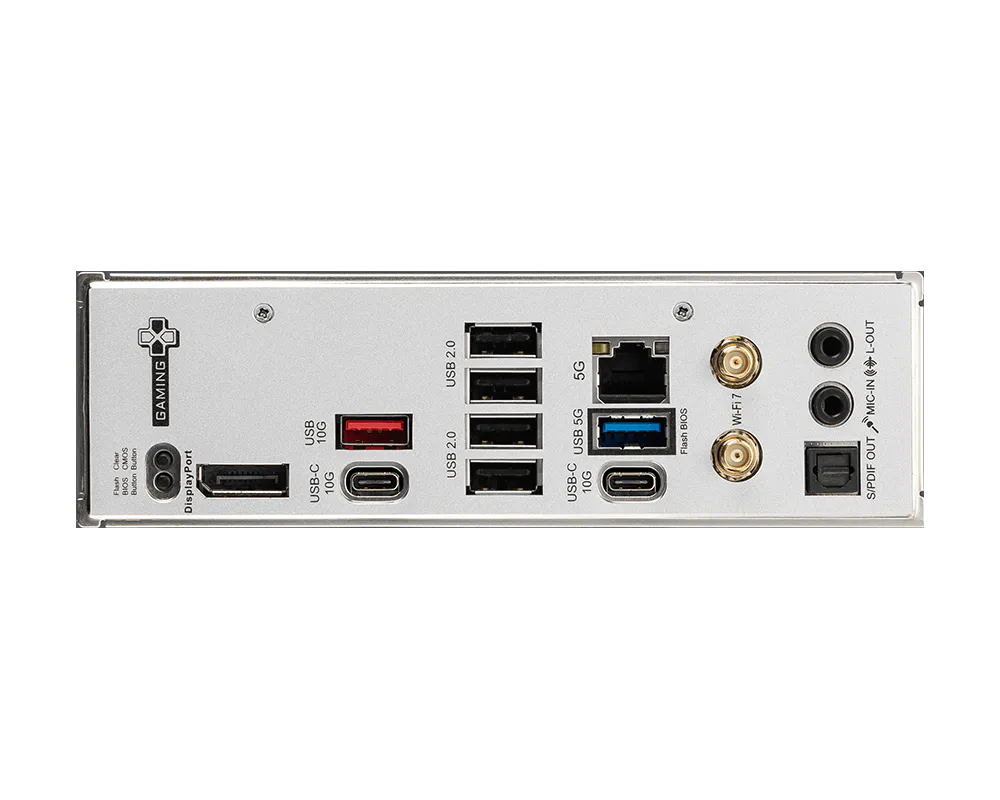
The B850 GAMING PLUS WIFI is crafted to offer extensive connectivity, versatile tools, and a premium Wi-Fi solution for gamers seeking a comprehensive experience. Featuring full-speed Wi-Fi 7, 5G LAN, PCIe 5.0 solution, Supplemental PCIe Power and exclusive EZ DIY features, it is ready for 24/7 non-stop gaming optimized for AMD Ryzen™ 9000 series processors.


Less steps, control easily

12+2+1 Duet Rail Power System

Extended Heatsink Design

Full-speed Wi-Fi 7 & 5G LAN

One-Click overclocking

Optimized UI / UX design

Ready for AI PC
เมนบอร์ด MSI ออกแบบด้วยฮาร์ดแวร์และเทคโนโลยีระดับสูง รองรับการประมวลผลหนักๆ ทั้งการเล่นเกม และการใช้งาน AI ได้อย่างเต็มประสิทธิภาพ นอกจากนี้ เรายังได้นำเทคโนโลยี AI เข้ามาใช้ใน MSI Center และ BIOS ช่วยให้ทุกการควบคุมและการปรับแต่งเป็นเรื่องง่ายกว่าที่เคย
AI Engine
มาพร้อมระบบจัดหมวดหมู่ที่ช่วยให้คุณซิงก์แอปพลิเคชันที่ต้องการใช้งาน พร้อมปรับแต่งระบบให้อัตโนมัติ เพื่อสร้างสภาวะการทำงานที่สมบูรณ์แบบและสะดวกสบายที่สุด
AI LAN MANAGER
ช่วยปรับแต่งประสิทธิภาพเครือข่ายและลดค่าความหน่วง (Latency) เพื่อส่งมอบประสบการณ์ออนไลน์ที่ลื่นไหลไม่มีสะดุด
Frozr AI Cooling
ปรับความเร็วพัดลมอัตโนมัติ เพื่อให้ระบบเย็น เสถียร และทำงานได้เต็มประสิทธิภาพอยู่เสมอ
AI Boost
เป็นฟีเจอร์เอกสิทธิ์เฉพาะจาก MSI ที่ช่วยโอเวอร์คล็อก NPU เพื่อยกระดับประสิทธิภาพการประมวลผล AI ให้สูงยิ่งขึ้น
OPTIMAL EFFICIENCY


Extended Heatsink

M.2 Shield Frozr


6-Layer Server Grade
with 2oz Copper PCB

Pump Fan Support

Heatsink with 7W/mK Thermal Pad

12+2+1 Duet Rail Power System

PCIe Supplemental Power
HIGH-SPEED TRANSMISSION


5G LAN

Full-Speed Wi-Fi 7

Lightning Gen 5
PCIe & M.2 Slots

Latest DDR5 Memory

Front USB Type-C

Triple M.2 Connectors
EFFORTLESS ASSEMBLY


Clear CMOS &
Flash BIOS Button

Pre-installed I/O Shield
EZ M.2 Shield Frozr II

EZ M.2 Clip II

EZ Debug LED

EZ PCIe Clip II

Steel Armor

EZ Conn Design
EZ DIY
- ONE-FINGER
- ONE HAND
- ONE STEP
- ONE GLANCE
- ONE CLICK
- EZ M.2 INSTALLATION
- EZ GPU INSTALLATION
- EZ BUTTON
ถูกพัฒนาอย่างพิถีพิถันโดย MSI ช่วยให้สามารถติดตั้งและถอด SSD ได้ง่ายโดยไม่ต้องใช้สกรู เพิ่มความสะดวกสบายขึ้นอย่างมาก
EZ M.2 Shield Frozr II และ EZ M.2 Clip II ซึ่งเป็นฟีเจอร์เอกสิทธิ์เฉพาะจาก MSI ช่วยให้การติดตั้ง M.2 SSD กลายเป็นเรื่องง่ายดาย เพียงเสียบ M.2 SSD ลงในช่อง แล้วกดลงเบาๆ ตัวคลิปจะล็อกเข้าที่ทันที และเมื่อต้องการถอด SSD ออก เพียงแค่สะกิดคลิปออกด้านนอก SSD ก็จะปลดล็อกออกมาอย่างง่ายดาย ทุกขั้นตอนลื่นไหลโดยไม่ต้องพึ่งอุปกรณ์เหมือนแต่ก่อน แค่ใช้นิ้วเดียวก็มอบประสบการณ์ DIY ที่สมบูรณ์แบบให้คุณได้
ขอแนะนำ EZ M.2 Clip II Remover จาก MSI อุปกรณ์ชิ้นเล็กแต่สุดคูลที่ออกแบบมาเพื่อช่วยให้คุณเปลี่ยนหรือย้ายตำแหน่ง EZ M.2 Clip II บนเมนบอร์ดได้อย่างง่ายดาย เครื่องมือนี้ช่วยให้ผู้ใช้ถอด EZ M.2 Clip II ออกจากเมนบอร์ด แล้วนำไปติดเข้ากับช่อง M.2 ช่องอื่นได้ตามต้องการทันที โดยแถมมาให้ฟรีในกล่องอุปกรณ์เสริมของเมนบอร์ด MSI

One Finger for EZ GPU Installation
EZ PCIe Clip II แบบใหม่ ซึ่งติดตั้งอยู่บนช่องเสียบแรก มาพร้อมกับกลไกแรงดีดกลับ ที่ช่วยให้สามารถถอดการ์ดจอออกได้อย่างง่ายดาย เพียงแค่ใช้หนึ่งนิ้วกดลงไปที่ตัวล็อกบริเวณส่วนหาง และด้วยการออกแบบอันยอดเยี่ยมนี้ ผู้ใช้งานจึงสามารถถอดการ์ดจอออกได้อย่างสะดวกสบายไร้กังวล แม้ในพื้นที่ที่จำกัดหรือคับแคบภายในเคสคอมพิวเตอร์ก็ตาม


ฟีเจอร์เพื่อสาย DIY

โดยไม่จำเป็นต้องติดตั้ง CPU หรือแรม ดูเพิ่มเติม

- PRE-INSTALLED I/O SHIELD
- EZ Mounting
The Pre-Installed I/O Shield offers a streamlined and hassle-free installation experience by eliminating the need to manually fit the I/O shield during motherboard setup. With its built-in design, it ensures proper alignment and a secure fit, providing both protection and convenience while enhancing the overall durability of your build.


EZ MOUNTING
ลายวงจรบนเมนบอร์ด MSI ถูกออกแบบให้เว้นระยะห่างจากน็อตยึดเคสอย่างเป็นระเบียบและปลอดภัย นอกจากนี้ ยังมีการสกรีนสีป้องกันรอบรูยึดสกรูทุกจุด เพื่อป้องกันไม่ให้อุปกรณ์ขูดขีดหรือสร้างความเสียหาย แก่ตัวเมนบอร์ด

แจ้งเตือนป้องกันการกระแทก

ระยะเว้นปลอดภัย

ระบบป้องกันไฟฟ้าสถิตสองชั้น
- EZ Antenna
- EZ Conn-Design
- DRIVER UTILITY INSTALLER
MSI EZ Antenna makes the process effortless by simply attaching fasteners to the motherboard without rotation.


พอร์ต JAF_1 เอกสิทธิ์เฉพาะจาก MSI ช่วยให้พัดลม MPG EZ120 ARGB ทำงานได้ผ่านสายเชื่อมต่อเพียงเส้นเดียว นอกจากนี้ยังสามารถเปลี่ยนพอร์ต JAF_1 ให้กลายเป็นพอร์ต ARGB Gen 1 และพอร์ตพัดลมเพิ่มเติมได้ง่ายๆ ด้วยสาย 1-to-2 EZ Conn-Cable พิเศษ ช่วยลดความยุ่งยากของการจัดสายและเพิ่มประสิทธิภาพในการประกอบเครื่องอย่างลงตัว


MSI DRIVER UTILITY INSTALLER
เมื่อเชื่อมต่ออินเทอร์เน็ตแล้ว MSI Driver Utility Installer จะตรวจจับและแสดงรายการไดรเวอร์รวมถึงยูทิลิตี้ที่เหมาะสมให้โดยอัตโนมัติ ช่วยให้คุณสามารถดาวน์โหลดและติดตั้งทุกอย่างเสร็จสิ้นได้เพียงไม่กี่คลิก เรียนรู้เพิ่มเติม
*โปรดตรวจสอบให้แน่ใจว่าได้เชื่อมต่ออินเทอร์เน็ตแล้ว มิฉะนั้นโปรแกรม Driver Utility Installer จะไม่เปิดทำงานโดยอัตโนมัติ
*MSI Driver Utility Installer จะพร้อมใช้งานบน Windows 11 เวอร์ชัน (Build) 22H2 เป็นต้นไป.

- EZ DEBUG
- EZ Identify
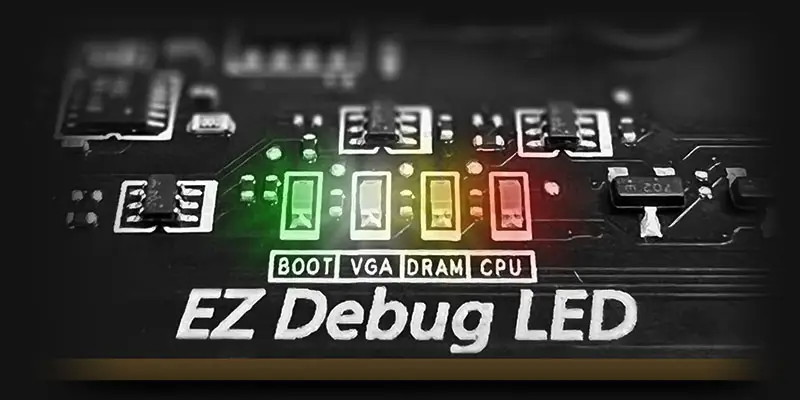
EZ DEBUG LED
ไฟ LED แจ้งสถานะบนบอร์ด จะช่วยระบุต้นตอของปัญหา ทำให้คุณรู้จุดที่ต้องตรวจสอบได้อย่างแม่นยำ เพื่อให้ระบบกลับมาเปิดใช้งานได้ตามปกติอีกครั้ง


- EZ OVERCLOCKING
- EZ Optimization
EZ Ooverclocking
While overclocking can be overly complex for some, MSI Click BIOS X made it more accessible with multiple one-click overclock features for both processor and memory, allowing users to easily enhance system performance without delving into intricate settings.
-

GAME BOOST
One-click CPU overclock automatically optimizes your CPU performance, instantly tuning it to the best possible level.
-

AI BOOST
An intelligent algorithm boosts NPU performance to get the best possible AI performance when you need additional horsepower.
*Enabled with compatible processors. -

EXPO / A-XMP
Choose from preset EXPO and A-XMP profiles to automatically overclock compatible DDR memory for optimal performance.

จัดเต็มด้วยหลากหลายฟีเจอร์ AI ที่เข้ามาช่วยยกระดับทุกประสบการณ์การใช้งานคอมพิวเตอร์ของ คุณ ด้วยการปรับแต่งระบบให้ชาญฉลาดแบบเรียลไทม์ พร้อมซอฟต์แวร์ MSI Center ที่มาในหน้าตา ดีไซน์เรียบหรูและใช้งานง่าย ช่วยให้คุณปรับแต่งและจัดการตั้งค่าพีซีได้ตามต้องการ ยกตัวอย่างเช่น AI Engine ที่จะช่วยปรับการตั้งค่าของระบบให้อัตโนมัติโดยอิงจากแอปพลิเคชันที่คุณกำลังใช้งาน เพื่อประสิทธิภาพที่ลื่นไหลที่สุด

ULTRA PERFORMANCE
- Power Solution
- memory
- PROTECTION
- POWER DESIGN
- PCB DESIGN
- EZ OC TUNING
- MORE FOR PERFORMANCE
12+2+1 Duet Rail Power System
Unleash and sustain maximum performance with an aggressive VRM design built with digital CPU power system. Combining 8 + 8-pin power connectors and exclusive Core Boost technology, the B850 GAMING PLUS WIFI is ready to sustain heavy gaming loadings.
12
PHASE
2
PHASE
1
PHASE

CPU Power

Core Boost

Digital Power

OPTIMIZED PCB SOLUTION
The PCB design has been optimized for higher bandwidth and faster transfer speeds, which is also beneficial for reliable circuit transmission.

- 6 PCB layers
- Server-grade PCB material
- 2oz Thickened Copper
MSI exclusive Performance Preset is a more intuitive way to boost performance by setting the power limitation as your preference. There are two level setting – PBO Auto & PBO Enable.

MSI PBO Thermal profiles are setting maximum CPU temperature at 85°C, 75°C and 65°C levels. With the thermal profiles, the CPU operates at lower voltage and temperature but remaining the same performance.

Config TDP is designed to provide ECO Mode (65W) or different TDP (PPT/TDC/EDC) settings for advanced users. By offering several profiles for different TDP settings in Click BIOS 5, Config TDP makes setting TDP profiles easier and don’t need to modify settings manually for each TDP.

ยกระดับเพื่อขีดสุดแห่งประสิทธิภาพ


- DDR5
- HIGH-EFFICIENCY MODE
DDR5 MEMORY SUPPORT WITH HIGH PERFORMANCE
A huge step of DDR performance enhancement with the latest DDR5 memory. Combines with dedicated SMT welding process and MSI Memory Boost technology, B850 GAMING PLUS WIFI is ready to deliver the world class memory performance.

The High-Efficiency Mode is designed to optimize memory performance byincreasing memory bandwidth and reducing latency. With the four sets of RAM timing settings, it allows users to find out the optimal configuration based on the quality of their memory modules.

- TVS
- SOLID PIN DESIGN
- STAINLESS STEEL IO
- OCP Protection
- GROUNDING STRUCTURE
Transient Voltage Suppressors (TVS)
Transient Voltage Suppressors (TVS) คืออุปกรณ์ความปลอดภัยที่ใช้สำหรับป้องกันแรงดันไฟฟ้าที่สูงเกินไป โดยเมนบอร์ดของ MSI ทุกรุ่นได้รับการติดตั้ง TVS นี้มาให้อย่างครบครัน ซึ่งเมื่อแรงดันไฟฟ้าพุ่งสูงขึ้นอย่างผิดปกติ TVS จะเปลี่ยนสถานะจากความต้านทานสูง เป็นความต้านทานต่ำ ทันที เพื่อเบี่ยงทิศทางของแรงดันไฟฟ้าที่เกินนั้นลงดิน วิธีนี้จะช่วยป้องกันไม่ให้วงจรได้รับความเสียหายจากแรงดันไฟฟ้าสูงได้อย่างมีประสิทธิภาพ
solid pin design
คอนเน็กเตอร์จ่ายไฟแบบ 8 พิน และ 24 พินบนเมนบอร์ดของ MSI ทั้งหมด ได้รับการออกแบบให้เป็นขั้วต่อแบบขาตัน ซึ่งการออกแบบขาตันนี้ช่วยให้การส่งผ่านกระแสไฟ 12V ไปยัง CPU มีความเสถียรมากยิ่งขึ้น แม้ในสภาวะที่ต้องรองรับโหลดกระแสไฟฟ้าสูงก็ตาม
ข้อดีของคอนเน็กเตอร์จ่ายไฟแบบขาตัน
- ความเสถียรที่เหนือกว่า: พื้นที่หน้าสัมผัสที่ใหญ่ขึ้นช่วยเพิ่มความเสถียรในระหว่างการจ่ายพลังงานไฟฟ้า
- ความต้านทานต่ำ: ขาต่อแบบตัน มอบค่าความต้านทานทางไฟฟ้าที่ต่ำ ช่วยให้กระแสไฟไหลผ่านได้อย่างมีประสิทธิภาพ
- ความทนทานสูง: การออกแบบด้วยขาต่อแบบตัน ช่วยให้มั่นใจได้ถึงความทนทานที่แข็งแกร่ง พร้อมรองรับทุกสภาวะการใช้งานที่หนักหน่วง
- เหมาะสำหรับการใช้งานที่ต้องรองรับกระแสไฟฟ้าสูง

ฝาหลังพอร์ตเชื่อมต่อ I/O สแตนเลสกันสนิม
เสริมชั้นฟองน้ำชนิดพิเศษร่วมกับฝาหลังป้องกันการกัดกร่อน ช่วยลดการเกิดไฟฟ้าสถิตและลดสัญญาณรบกวนจากคลื่นแม่เหล็กไฟฟ้า EMI ของระบบ พร้อมความทนทานที่เหนือกว่าฝาหลังแบบทั่วไปอย่างชัดเจน


* ภาพข้างต้นใช้เพื่อการโฆษณาเท่านั้น กรุณาตรวจสอบรายละเอียดเพิ่มเติมที่หน้าข้อมูลจำเพาะ
Over Current Protection
MSI motherboards prioritize safety with the embedded Overcurrent Protection (OCP), ensuring crucial components such as the USB ports, DDR memory, PWM IC, and CPU are shielded from excessive current. This proactive defense mechanism curtails the risk of damage or malfunction due to power surges, promoting long-term system stability. This commitment to safeguarding your hardware underscores MSI's dedication to producing motherboards that prioritize durability and stability.


The Grounding Structure of Power Phases
โครงสร้างระบบสายดินของภาคจ่ายไฟ ถือเป็นเอกสิทธิ์การออกแบบเฉพาะของ MSI โดยดีไซน์ที่ได้รับสิทธิบัตรนี้สามารถช่วยยับยั้งสัญญาณรบกวนแม่เหล็กไฟฟ้า (EMI) ที่เกิดจากภาคจ่ายไฟได้อย่างมีประสิทธิภาพ พร้อมทั้งช่วยนำพาความร้อนไปสู่ชั้นทองแดงที่มีคุณสมบัติเป็นสายดินได้อย่างรวดเร็วและมีประสิทธิภาพสูง


FROZR DESIGN
- FROZR GUARD
- FROZR SYNC
- FROZR CONTROL
- cooling overview
Cooling Overview

-
Extended Heatsink
Extended Heatsink enlarges the surface of heat dissipation and maintain the performance at heavy loads.
-
M.2 Shield Frozr
Strengthened M.2 thermal solution helps keep M.2 SSD safe and ensures incredible performance.
-
Heavy Plated VRM Heatsink
The VRM heatsink covers the upper MOS and helps dissipate the heat.
-
7W/mK Thermal Pad & Additional Choke Pad
High-quality 7W/mK MOSFET thermal pads and additional choke thermal pads ensure stable performance when all cores are running at high speed.
-
Enlarged Chipset Heatsink
The enlarged heatsink is designed to reduce dust and noise and capable of maintaining high efficiency of heat dissipation.
- SYSTEM COOLING
- COMBO FAN
DIY 2.0 – INTEGRATING WITH THE SYSTEM ENVIRONMENT
Connect and synchronize with MSI coolers and cases with strategically positioned pin-header locations including a dedicated pump-fan header.

FOR CPU COOLER

FOR LIQUID COOLER
3A power deliver / Supports auto-detect

FOR SYSTEM FAN
Supports auto-detect

EXCLUSIVE EZ CONN. - JAF_1
2A power deliver(fan) / Supports dedicate MSI PC components.
Lean more
MSI Combo Fan Header พอร์ตเชื่อมต่อเอนกประสงค์ รองรับทั้งปั๊มน้ำและพัดลม PWM/DC พร้อมระบบตรวจจับประเภทอุปกรณ์อัตโนมัติ โดดเด่นด้วยพินสีเทาช่วยให้สังเกตและเสียบใช้งานได้ง่าย


- COOLING WIZARD
- FROZR AI COOLING
- AUTO DETECT FAN
Cooling Wizard ฟีเจอร์จัดการพัดลมครอบคลุมทุกอุปกรณ์ MSI มอบความยืดหยุ่นด้วยการรองรับพัดลมและปั๊มน้ำระบบ PWM/DC ปรับแต่งความเย็นและลดเสียงรบกวนให้พีซีของคุณได้อย่างง่ายดาย พร้อมระบบติดตามอุณหภูมิแบบเรียลไทม์ ปรับจูนประสิทธิภาพสูงสุดได้เพียงคลิกเดียว

Multiple Profiles
บันทึกได้สูงสุด 5 โปรไฟล์ รองรับการใช้งานในทุกสถานการณ์


พัดลมอัจฉริยะ & ปรับแต่งเอง
-
Smart Fan
ปรับแต่งเส้นโค้งอุณหภูมิได้อย่างง่ายดายด้วยจุดปรับ 4 จุด
-
Manual Fan
ปรับตั้งค่าอุณหภูมิตามเปอร์เซ็นต์ที่กำหนดได้ด้วยตนเอง


User Scenario
-
Follow MSI Center Mode
ปรับแต่งการทำงานของพัดลมอัตโนมัติตามโหมดการใช้งานที่คุณเลือกใน User Scenario
-
BIOS Mode
ปรับตั้งค่าพัดลมใน BIOS
-
Customize by User
ปรับแต่งตั้งค่าพัดลมได้โดยผู้ใช้


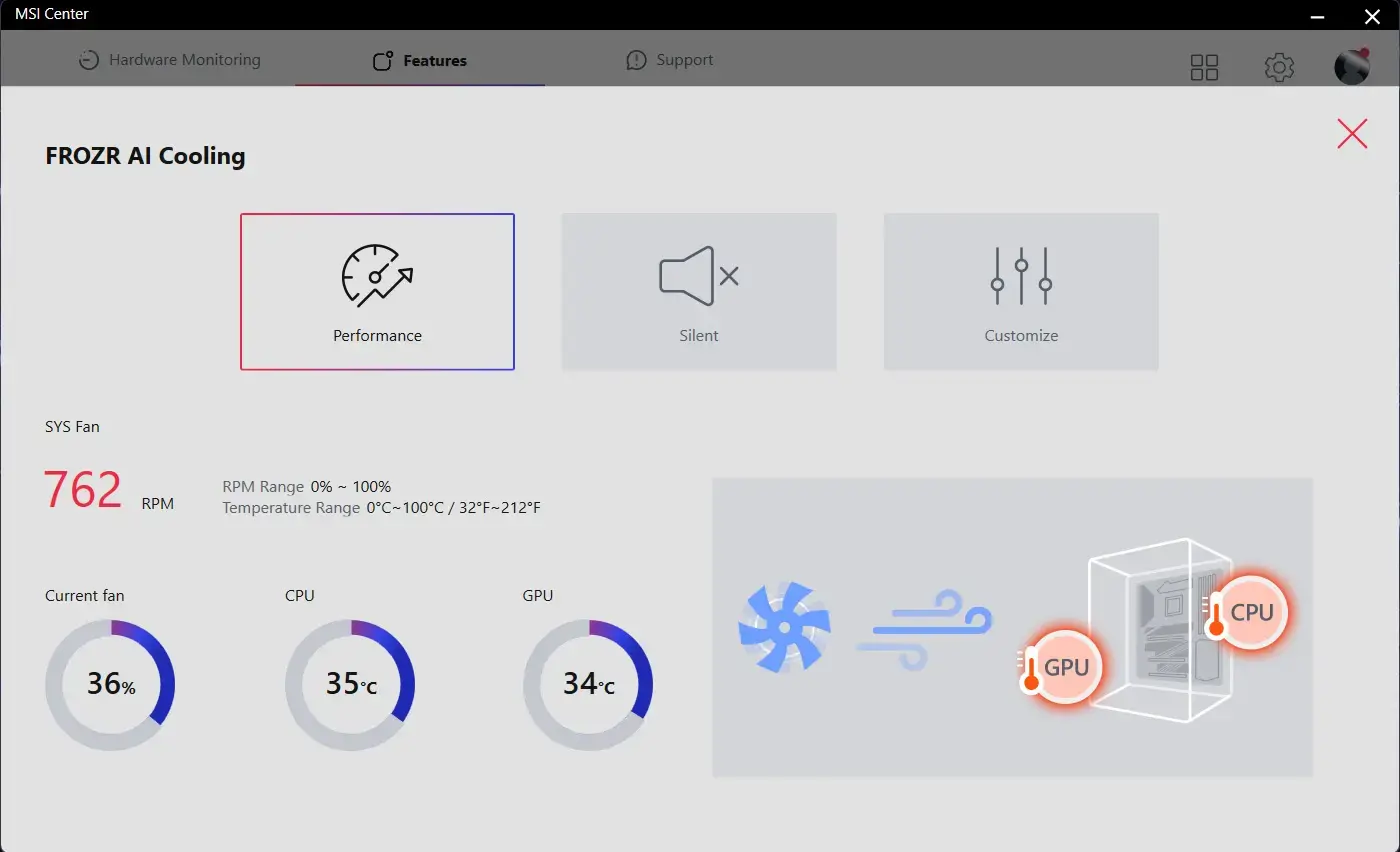
Frozr AI Cooling ระบบตรวจจับอุณหภูมิ CPU และ GPU อัจฉริยะ ปรับระดับความเร็วพัดลมระบบให้อัตโนมัติ เพื่อคงประสิทธิภาพการทำงานในระดับสูงสุด
พินเชื่อมต่อพัดลมของ MSI สามารถตรวจจับโหมดการทำงานของพัดลมทั้งแบบ DC และ PWM ได้โดยอัตโนมัติ เพื่อปรับแต่งความเร็วพัดลมและความเงียบได้อย่างสมบูรณ์แบบ พร้อมระบบ Hysteresis ที่ช่วยให้พัดลมเร่งความเร็วรอบได้อย่างนุ่มนวล ไม่กระชากเสียง มั่นใจได้ว่าเครื่องของคุณจะทำงานอย่างเงียบสงบในทุกสถานการณ์

TRILINK
- networking
- storage
- Expansion
- FLAWLESS CONNECTION
- WIFI 7 Solution
- AI Lan Manager
HIGH-BANDWIDTH AND LOW-LATENCY NETWORK
MSI's premium network solution provides incredible data transfer speed for demanding users.


5G LAN

Wi-Fi 7

EZ Antenna with Magnetic Stand
Wi-Fi 7 is the latest wireless solution that takes a huge leap forward with multiple improvements to meet the traffic demand brought and the growing number of wireless devices.
*Windows 11 compatibility only
Wi-Fi 7 (802.11be) introduced higher speeds, wider channels, improved efficiency, and reduced latency over Wi-Fi 6 (802.11ax). It also improved battery life and provided better performance in crowded environments.
The Wi-Fi 7 provides maximum speeds to a whopping 5.8 Gbps! 2.4 times faster than previous Wi-Fi 6/6E standards, Wi-Fi 7 is set to be the wireless standard of the future.
Previous Wi-Fi generations have had to make do with 160MHz channel widths. Wi-Fi 7 brings this width up to 320MHz (on 6GHz) – ensuring better reliability during simultaneous transmissions at max speeds.
The higher QAM(Quadrature Amplitude Modulation) value, the more data each packet can carry. Wi-Fi 7 improves the modulation scheme from 1024-QAM to 4096-QAM – boosting peak transmission rates and network capacity.
Wi-Fi 7 enables devices to simultaneously send and receive data across several frequency bands and channels to meet the traffic demand brought and the growing number of wireless devices.
AI LAN Manager
MSI AI LAN Manager automatically classifies and prioritizes the latency-sensitive applications for online games, giving you the best online gaming experience with low latency.
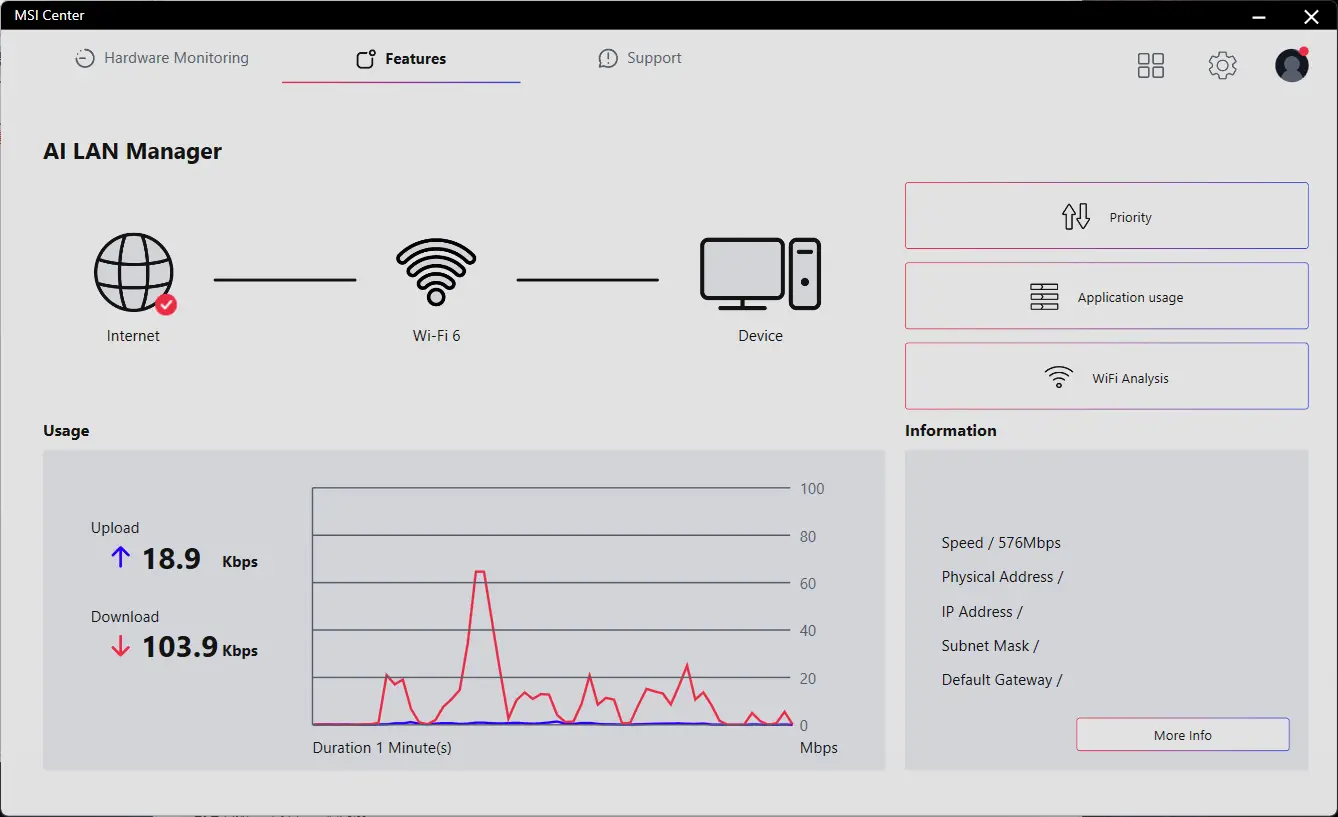
MSI AI LAN MANAGER
- Automatically prioritizes games above other applications
- Allows to change applications' traffic priority
- Allows to customize bandwidth for each application
- Analysis Wi-Fi signals to select the best source.
- STORAGE
FAST AND FUTURE-READY STORAGE
MSI Gaming series motherboards support all the latest storage standards, which allows users to connect any ultra-fast storage device. Start games faster, load levels faster and have a real advantage over your enemies.
1x

1x

1x

- LIGHTNING GEN 5 PCI-E
- PCIe SUPPLEMENTAL POWER
- FRONT USB TYPE-C
LIGHTNING GEN 5 PCI-E WITH STEEL ARMOR

LIGHTNING GEN 5 PCI-E
Doubling over the previous generation, the bandwidth of a x16 interface can reach 128GB/s.

SMT PCIE 5.0 SLOT
The advanced SMT(Surface Mount Technology) PCIE slot diminish interference and electrical noise, fully support the PCI-E 5.0 signal.



HEAVY SOLDERED CONNECTIONS
MSI PCI Express Steel Armor slots are secured to the motherboard with extra solder points and support the weight of heavy graphics cards. When every advantage in games counts, Steel Armor shields the point of contact from electromagnetic interference.
PCIe supplemental power
The exclusive Supplemental PCIe Power connector provides dedicated power for the high-power demands of GPUs used in AI computing and gaming, ensuring stable, efficient, and sustained performance.Learn more about chassis compatbility.


USB FRONT TYPE-C
MSI Gaming motherboards support USB Front Type-C that allows gamers to connect with the latest USB devices. Built up a system with MSI PC case to have the most convenient experience.


Experience
- audio
- mystic light
- BIOS
- Software
- Audio Boost
- ISOLATED ANALOGY STRUCTURE
audio boost
- HIGH DEFINITION AUDIO PROCESSOR
- HIGH QUALITY AUDIO CAPACITORS
- HIGH QUALITY AUDIO JACKS
- ISOLATED AUDIO SIGNAL
- DE-POP PROTECTION


The Isolated Analogy Structure for Audio Connectors
เพื่อเสียงที่คมชัดใส MSI ได้พัฒนาโครงสร้างอันเป็นเอกลักษณ์อย่าง 'Isolated Analogy Structure' โดยโครงสร้างโลหะภายนอกของช่องเชื่อมต่อเสียงจะถูกแยกออกจากวงจรภายในโดยเด็ดขาด ช่วยให้มั่นใจได้ว่าคุณภาพเสียงจะคมชัดใส


* ภาพประกอบเพื่อการอ้างอิง กรุณาตรวจสอบสเปกสินค้าเพิ่มเติม
- Mystic Light
- Synchronized
เติมสีสันและเอฟเฟกต์ไฟ RGB ที่มีชีวิตชีวาด้วยยูทิลิตี้ Mystic Light ใน MSI Center ซึ่งมีเฉลเพดสีให้เลือกนับล้านและเอฟเฟกต์ LED สุดล้ำ สนุกไปกับการควบคุมและความคิดสร้างสรรค์เต็มรูปแบบสำหรับไฟในพีซีของคุณได้ด้วยซอฟต์แวร์เดียว
-
Wave
-
Steady
-
Flame
-
Breathing
-
CPU Temperature
-
Color Ring
-
Lightning
-
Receration
-
Meteor
-
Default
เพิ่มสีสันให้สะใจยิ่งขึ้น! พินเฮดเดอร์ส่วนขยาย Mystic Light ช่วยให้คุณควบคุมแถบไฟ RGB เพิ่มเติมและอุปกรณ์เสริม RGB อื่นๆ ที่ติดตั้งในระบบได้อย่างง่ายดายและเป็นธรรมชาติ โดยไม่ต้องใช้กล่องควบคุม RGB แยกต่างหาก
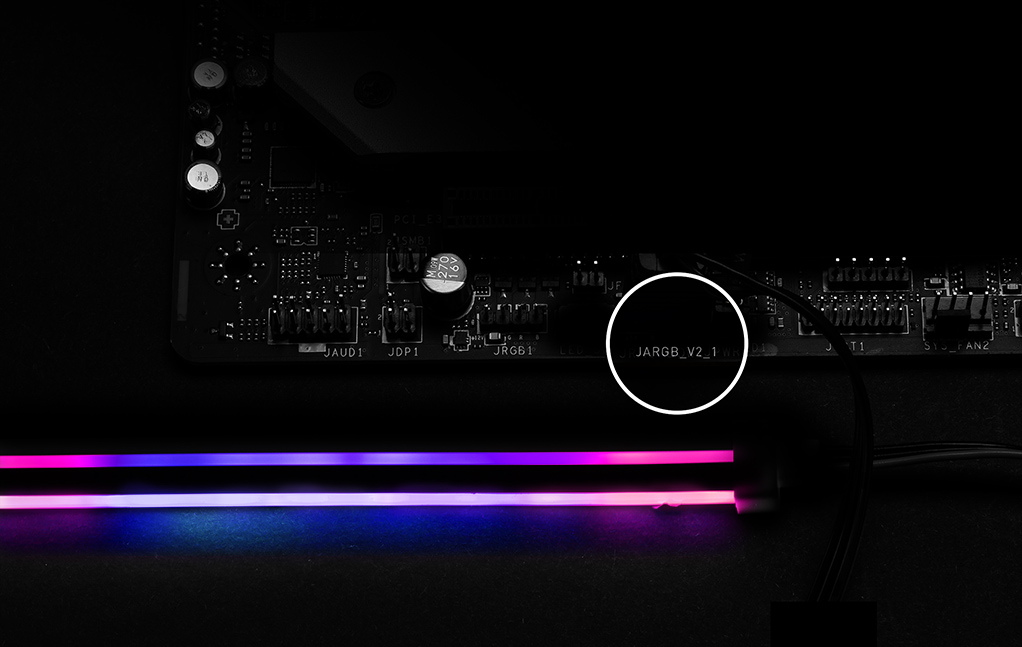
*อุปกรณ์ Gen2 รองรับเพียง 7 ธีม RGB เท่านั้น


- Click BIOS X
- BIOS KEY FEATURES
MSI’s newly designed CLICK BIOS X offers an aesthetically pleasing and user-friendly experience. The new design ensures that users of all experience levels can quickly access and adjust system configurations with ease.


- MSI CENTER
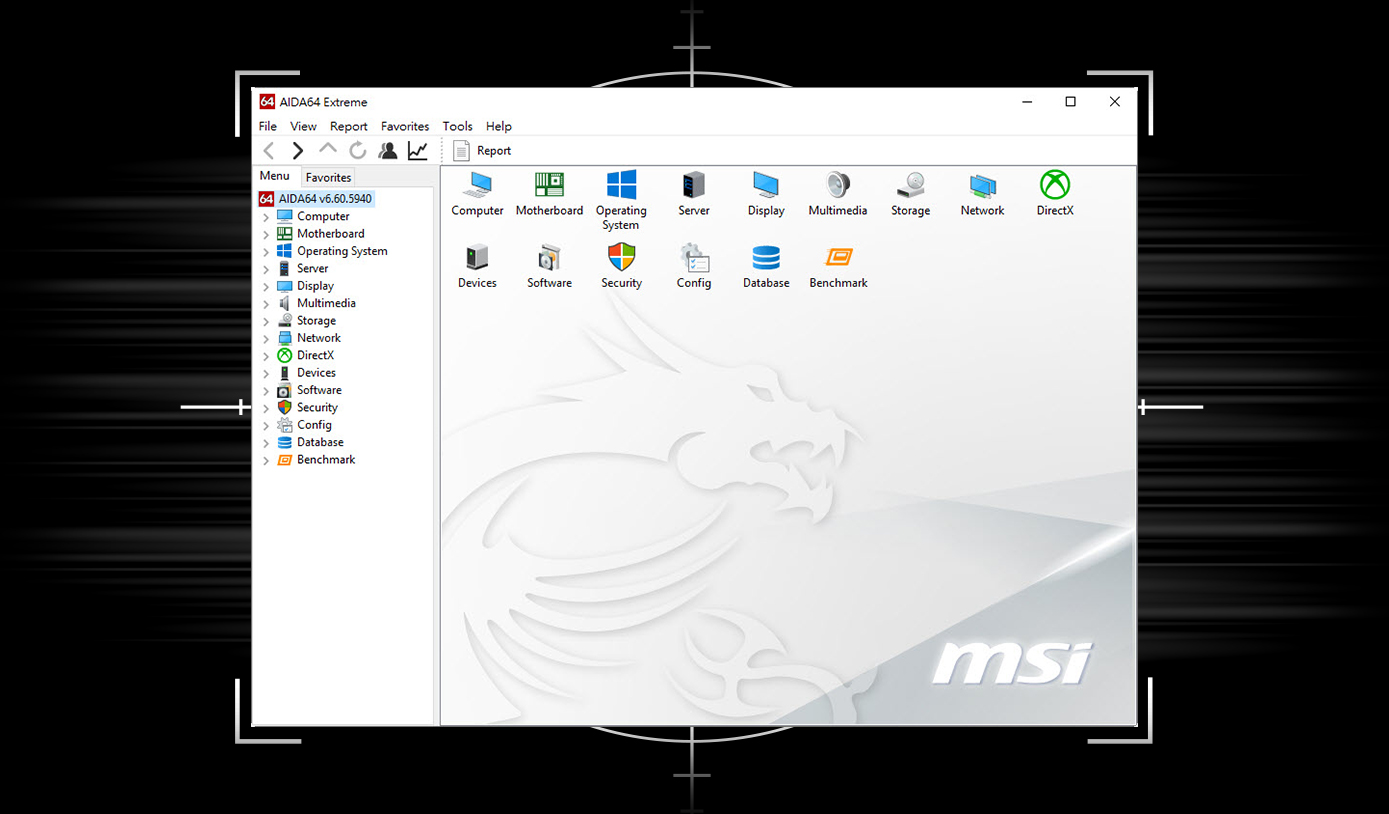
- AIDA64
- NORTON 360
MSI CENTER
MSI Center โฉมใหม่ล่าสุดจาก MSI รวบรวมยูทิลิตี้ซอฟต์แวร์ต่างๆ ของ MSI เข้าไว้ด้วยกันในแอปพลิเคชันส่วนกลางเพียงแอปเดียว ควบคุมฟีเจอร์ขั้นสูงของเมนบอร์ดและปลดล็อกความเป็นไปได้ที่ไร้ขีดจำกัด


เมนบอร์ด MSI มอบสิทธิ์ทดลองใช้ AIDA64 Extreme - ฉบับ MSI ฟรี 60 วัน AIDA64 Extreme เป็นแอปพลิเคชันสารพัดประโยชน์สำหรับข้อมูลระบบ การวินิจฉัย และการทดสอบประสิทธิภาพ ด้วยแอปพลิเคชันนี้ คุณสามารถตรวจสอบข้อมูลฮาร์ดแวร์และซอฟต์แวร์บนพีซีโดยละเอียด และบันทึกลงในไฟล์ได้หลายรูปแบบ เช่น CSV และ HTML
การปกป้องหลายชั้นสำหรับอุปกรณ์ของคุณ ฟีเจอร์ความเป็นส่วนตัวออนไลน์รวมถึง Secure VPN ของเรา บวกกับการตรวจสอบ Dark Web ทั้งหมดนี้รวมอยู่ในโซลูชันเดียว ด้วยเมนบอร์ด MSI คุณสามารถเพลิดเพลินกับการทดลองใช้ Norton 360 Deluxe ฟรี 60 วัน
- สำรองข้อมูลบนคลาวด์สำหรับพีซีสูงสุด 50 GB
- การป้องกันภัยคุกคามแบบเรียลไทม์และไฟร์วอลล์อัจฉริย
- ตัวจัดการรหัสผ่าน
- ระบบรักษาความปลอดภัยเว็บแคมสำหรับพีซี

ข้อเสนอทดลองใช้จาก MSI นี้ไม่สามารถใช้ได้กับลูกค้ารายเดิมของ Norton หากคุณมีการสมัครใช้งาน Norton ที่ยังใช้งานอยู่ คุณจะต้องยกเลิกการสมัครใช้งานเดิมจึงจะมีสิทธิ์รับข้อเสนอ สำหรับรายละเอียดที่สำคัญเกี่ยวกับการสมัครใช้งาน ราคา และข้อเสนอ โปรดดูข้อตกลงการอนุญาตให้ใช้สิทธิ์และบริการของ NortonLifeLock รวมถึงประกาศความเป็นส่วนตัวของผลิตภัณฑ์และบริการของ NortonLifeLock
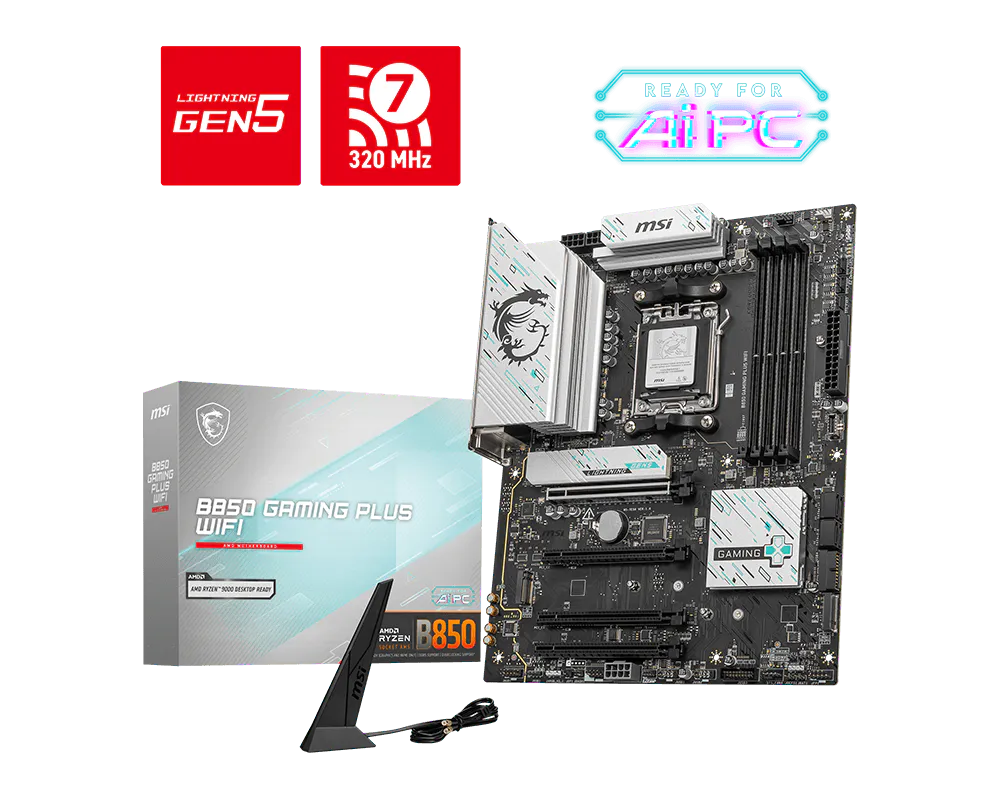
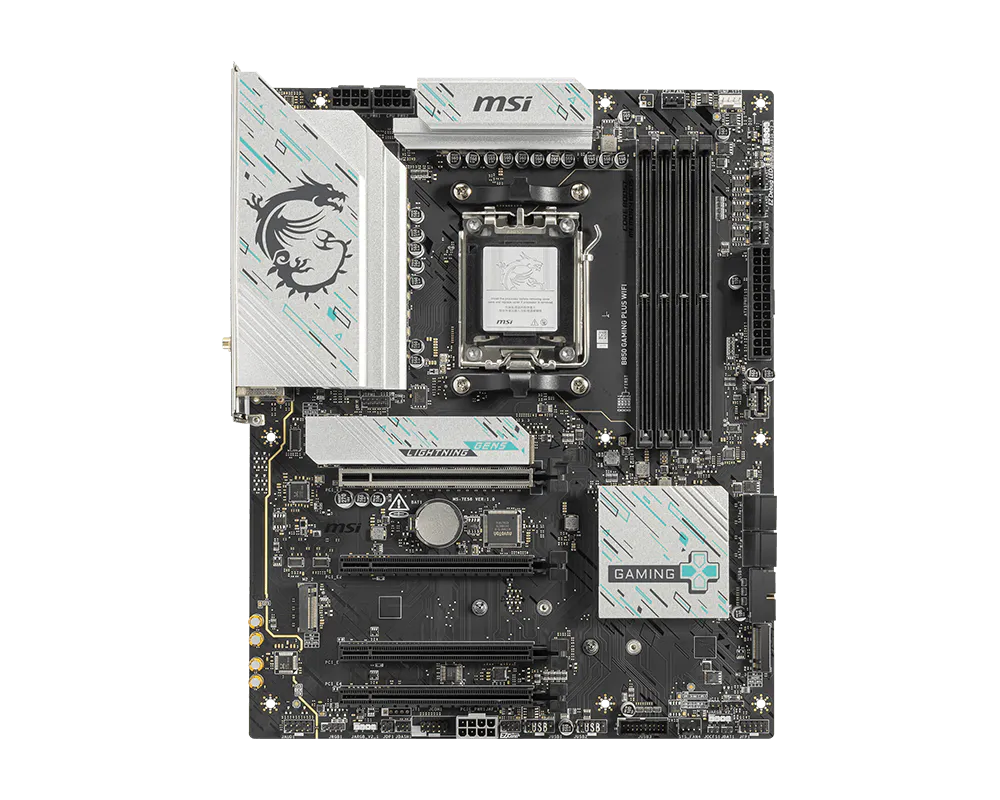
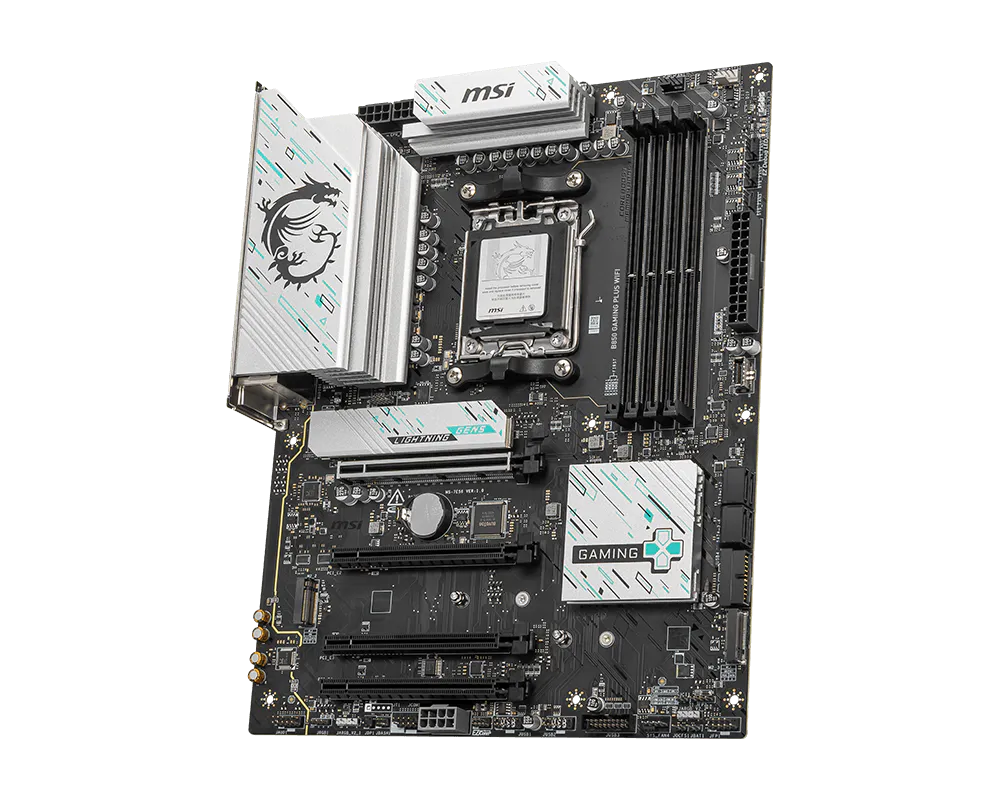
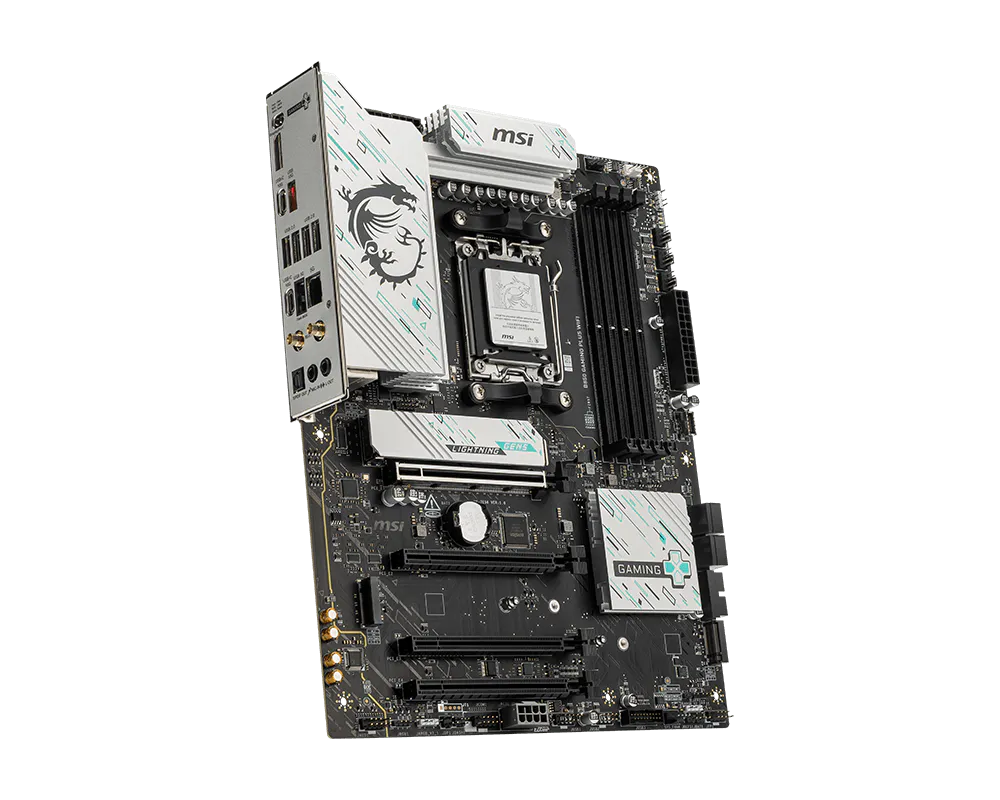
B850 GAMING PLUS WIFI
- Supports AMD Ryzen™ 9000 / 8000 / 7000 Series Desktop Processors
- Supports DDR5 Memory, Dual Channel DDR5 8200+ MT/s (OC)
- Ultra Performance: 12+2+1 Duet Rail Power System, dual 8-pin CPU power connectors, Core Boost, Memory Boost, 6-layer PCB made by 2oz thickened copper and server-grade level material
- Frozr Guard: Extended Heatsink, MOSFET thermal pads rated for 7W/mK, additional choke thermal pads and EZ M.2 Shield Frozr II are built for high performance system and non-stop experience
- High-speed Connectivity: 5G LAN with Full-speed Wi-Fi 7 Solution - The latest solution for professional and multimedia use, delivering secure, stable, and high-speed networking and data transmission
- Lightning Fast Game experience: PCIe 5.0 slot, Lightning Gen 5 x4 M.2, Front USB Type-C
- EZ DIY: EZ M.2 Shield Frozr II, EZ M.2 Clip II, EZ PCIe Clip II and EZ Antenna
- Audio Boost: Reward your ears with studio-grade sound quality for the most immersive gaming experience